- dbt replaces tangled stored procedures and homegrown frameworks with version-controlled SQL, built-in lineage, and automated tests. That's the real reason to learn it.
- You don't need to master dbt before you start. Knowing which concepts exist, and roughly why, is enough to keep anything from catching you off guard.
- Get comfortable on the command line and with Git first. Everything in dbt assumes you can move code around.
- Profiles, data layers, and modeling basics are the foundation. Get these right and the rest of dbt falls into place.
- Layer names like staging, bronze, or inlets are interchangeable conventions. Pick any of them, then keep your team consistent about what goes in each one.
Getting Started with dbt: What to Learn First
To get started with dbt, learn the command line and Git, how dbt connects to your warehouse, how it organizes data into layers, and the modeling concepts behind your tables.
You don't have to master any of it first. You just need to know it exists and why it matters.
Why dbt instead of stored procedures or a custom framework
Plenty of teams still run their transformations as stored procedures or a homegrown framework someone wrote years ago. The logic grows into thousands of lines spread across procedures and scripts, nobody can see how one piece connects to the next, and a change in one place quietly breaks something three steps downstream. You find out when a stakeholder asks why their numbers look wrong. When the person who built it leaves, the knowledge walks out with them.
dbt brings software engineering discipline to your transformations. Every model is version-controlled SQL the whole team can read. Dependencies are explicit through ref() and source(), so you get lineage for free instead of reverse-engineering it. Tests run automatically, and changes ship through pull requests like any other code. That's the shift analysts make when they move into analytics engineering, and it's why dbt is worth learning.
dbt replaces stored procedures and custom frameworks with version-controlled SQL, automatic lineage, and tests that run in CI.
Stored procedures and custom frameworks compared with dbt.
Here's the short list, roughly in the order it tends to come up.
Get your environment set up
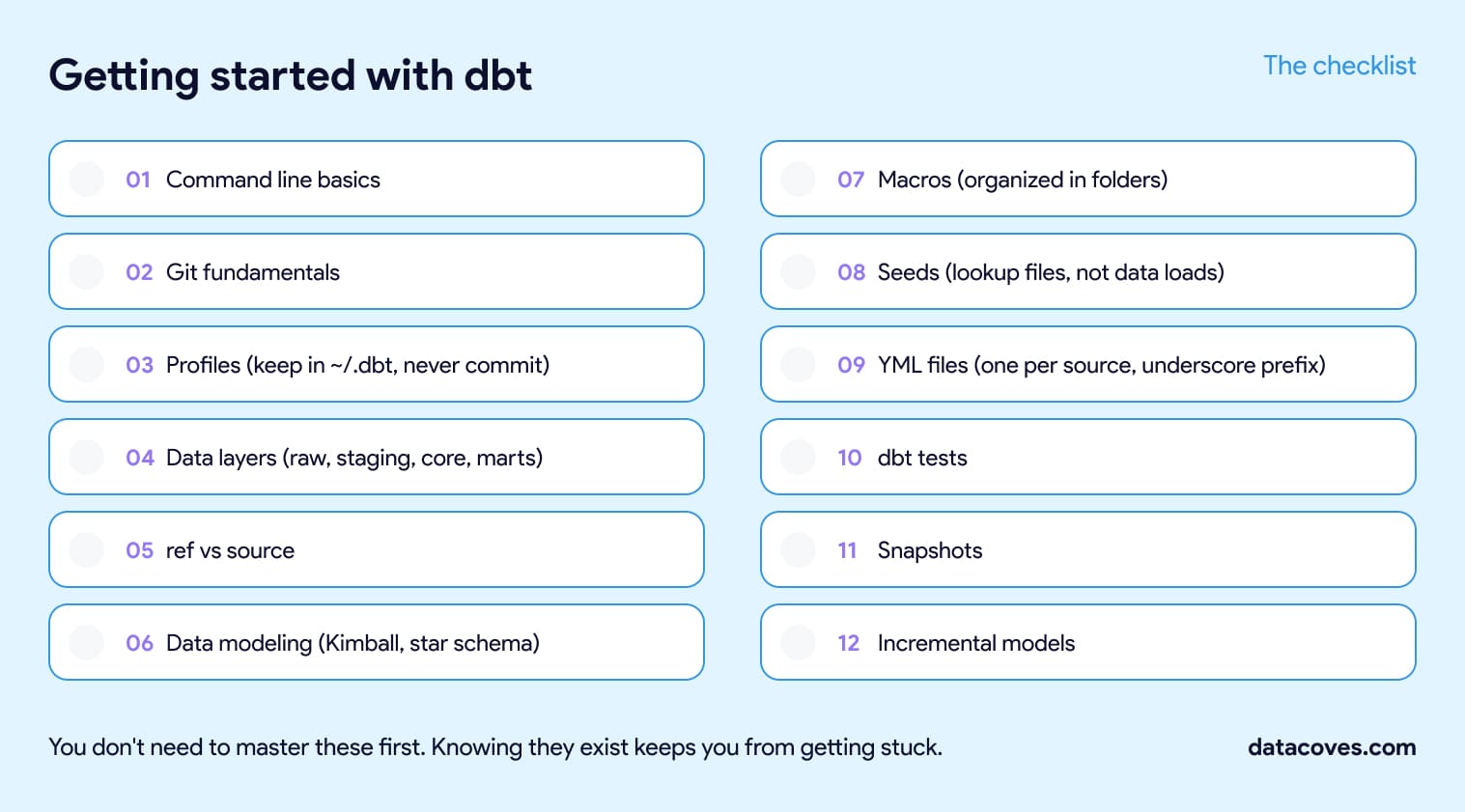
Command line basics. dbt runs from the terminal, so get comfortable there before anything else. You'll spend your day with cd, ls, mkdir, and the dbt commands themselves. If the terminal is new to you, Terminal Tutor builds the muscle memory quickly, and the dbt cheat sheet covers the dbt commands and selectors you'll reach for most.
Git fundamentals. Git is its own skill, separate from the command line, and it's how real dbt work ships. Learn clone, add, commit, push, and pull first, then move on to branching and pull requests, since that's how every team reviews and merges changes. The official Git tutorials and this walkthrough will get you there.
Profiles. Your profile tells dbt how to connect to your warehouse. If it's misconfigured, nothing runs, so it's worth getting right early and then you can mostly forget about it.
Keep profiles.yml in ~/.dbt, not in your project folder, and never commit it, since it holds your credentials (dbt docs on connection profiles). Datacoves and dbt Cloud both handle this part for you. The dbt terminology post breaks down how targets and outputs work inside the file.
Learn how dbt organizes and references data
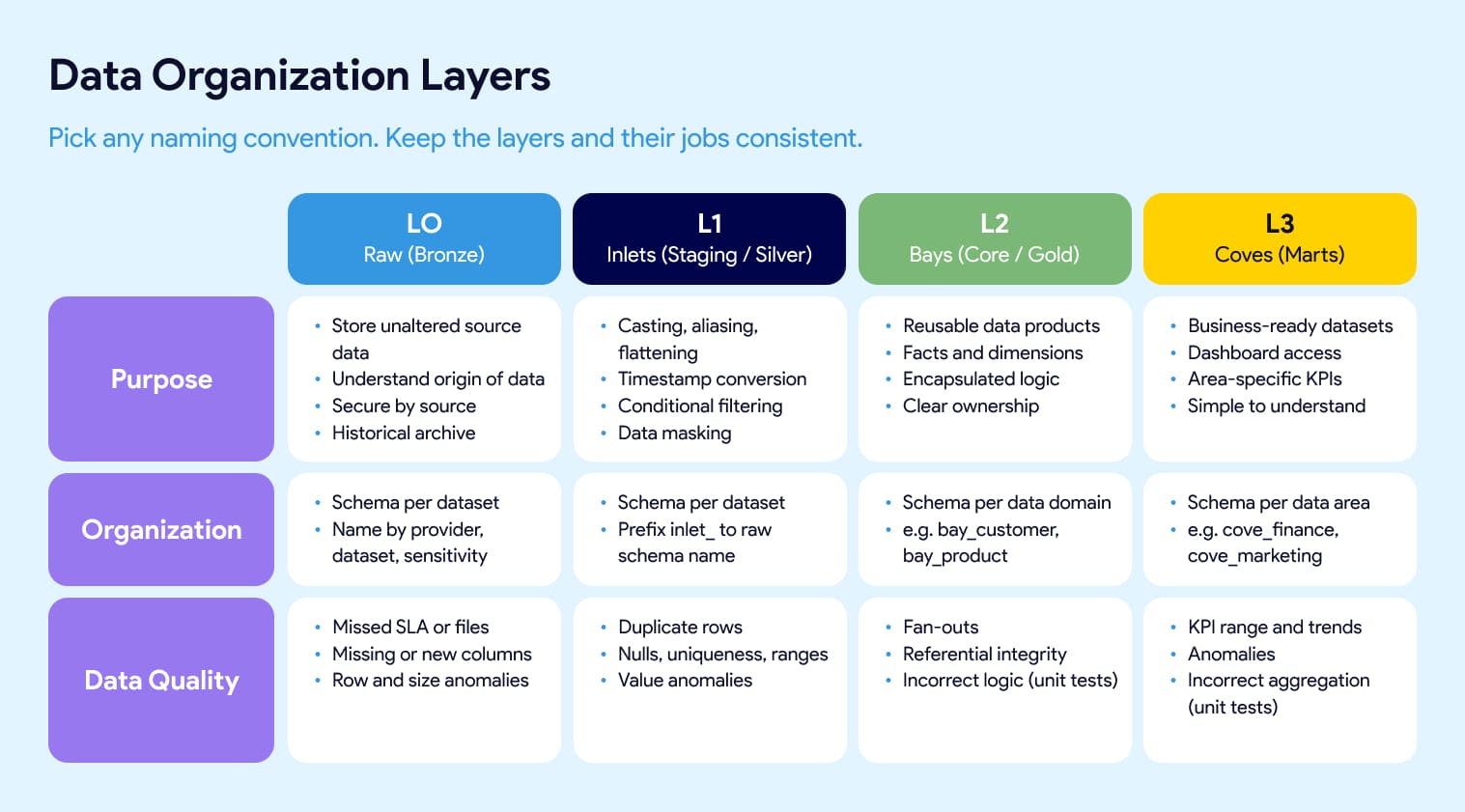
Data layers. Most dbt projects organize models into layers: raw, staging, core, and marts. You'll also hear bronze, silver, and gold. At Datacoves we use inlets, bays, and coves. They all map to the same idea. Raw lands untouched so you can trace origin and keep history. Staging does light cleanup like casting, aliasing, and flattening. Core is where reusable facts and dimensions get built. Marts are the business-facing models people actually query. Treat the names as an interchangeable convention. The part that affects your project is consistency: agree as a team on where facts and dims live, what each layer is responsible for, and which tests belong at each level. Our inlets, bays, and coves guide shows one way to define that.
Data layer names like staging, silver, and inlets are interchangeable conventions; the thing that affects your project is whether your team uses them consistently.
Ref vs source. This distinction tells you whether you actually understand lineage.
Use source() to reference raw tables loaded outside dbt and ref() to reference other dbt models.
Get them right and dbt builds your dependency graph for you. The dbt Jinja functions cheat sheet has the syntax.
Understand the modeling underneath your tables
Data modeling concepts. Before you write a model, learn the basics of dimensional modeling. Start with Kimball and the star schema, since it's still the most widely used approach (Kimball Group's dimensional modeling techniques). Primary keys, foreign keys, composite keys, and surrogate keys all live here, and they're what keep your data trustworthy once it's joined. This video is a quick tour of the main modeling approaches, and dbt-utils gives you generate_surrogate_key so you don't hand-roll them (see the dbt-utils cheat sheet).
The building blocks you'll use every day
Macros. Macros are reusable pieces of SQL logic, written with Jinja. Once they click, you'll wonder how you wrote SQL without them. Keep them in folders organized by purpose instead of dumping everything into one file, or your macros directory turns into a junk drawer fast. The dbt Jinja cheat sheet covers the syntax.
Seeds. Seeds are small static CSVs that dbt loads into your warehouse. Use them for cross-reference and lookup files, things like country codes or account mappings, not for loading real data. Keep them stable, since changing a seed means a code release. When the file's columns change, reload it with dbt seed --full-refresh. There's more in the dbt terminology post.
YML files. YML files hold your documentation, tests, and config. Don't pile everything into one giant sources.yml or models.yml. Use one file per source or model folder, prefixed with an underscore like _google_analytics.yml, so it sorts to the top of the folder and lives right next to what it describes. Small, focused files are far easier to find and review.
dbt tests. Tests catch problems before they reach a dashboard. dbt ships with generic tests like unique and not_null, you can write your own singular tests as plain SQL, and packages like dbt-expectations and dbt-utils add more. Start simple and add coverage where it hurts. Our overview of dbt testing options lays out when to use each.
Snapshots. Snapshots capture how a record changed over time, which is dbt's answer to slowly changing dimensions. You'll want this the first time someone asks what a customer's status was three months ago. The dbt docs on snapshots are the place to start.
Incremental models. When full refreshes start hurting, incremental models are what save you. Instead of rebuilding a table from scratch on every run, dbt only processes new or changed rows. You won't need this on day one, but you'll be glad you know it exists when a table gets big. The analytics glossary has a quick definition.
Where to learn more
A few resources worth bookmarking as you go:
- DataGym.io, hands-on dbt practice built by Bruno Lima. Follow Bruno on LinkedIn too, he shares some of the best practical dbt tips around.
- dbt Fundamentals, dbt Labs' official course.
- dbt Terminology for when a word trips you up.
- dbt Libraries, a curated set of packages and adapters worth knowing about.
Going from zero to a mature data stack
You'll pick up most of this on the job. The point of the list is that when these concepts show up, and they will, you'll recognize them instead of getting stuck. That's the individual side of dbt.
Running dbt across a team is a bigger job. Someone has to settle your Git repository structure and branching strategy, decide how many environments and schemas you need, set dbt development standards and approve the packages and macros people can use, stand up CI/CD and Slim CI, write the documentation and SQL linting rules, build the Airflow orchestration, and handle PII masking and warehouse roles. Those choices are the foundation a mature stack sits on, and reversing them later is painful.
Datacoves manages the platform and sets up the foundational DataOps and security decisions, so teams go from zero to a mature data stack in weeks.
That's where Datacoves comes in, on both fronts. We manage the platform, so your team isn't maintaining dbt, Airflow, and CI/CD on Kubernetes. And our Data Architecture Foundation engagement sets those decisions up with you, from Git and environment design to CI/CD, documentation and linting standards, orchestration, and PII handling, so a team can go from zero to a mature stack in weeks. If that's where you're headed, a free architecture review is a good place to start.