- dbt Core (now dbt v1) includes three test types out of the box: generic tests (unique, not_null, accepted_values, relationships), singular tests for custom SQL assertions, and unit tests (dbt 1.8+)for validating transformation logic before it reaches production.
- Community packages like dbt-utils (16 additional generic tests) and dbt-expectations (62 tests modeled after Great Expectations) cover most validation needs beyond what ships with dbt Core.
- Tools like dbt-checkpoint enforce governance and documentation standards on every pull request, so testing coverage doesn’t depend on manual code review.
- Start with generic tests on your most critical models and expand from there. You don’t need full coverage on day one to get value from dbt testing.
dbt testing gives data teams a way to validate data quality, transformation logic, and governance standards directly inside their development workflow. Out of the box, dbt Core includes generic tests (unique, not_null, accepted_values, relationships), singular tests for custom SQL assertions, and unit tests for verifying transformation logic before it reaches production. Community packages like dbt-utils and dbt-expectations add dozens more. Combined with CI/CD tools like dbt-checkpoint, teams can enforce testing and documentation standards on every pull request.
This guide covers every layer: what ships with dbt Core, which packages to add, how to store and review results, and how to integrate testing into your CI/CD pipeline.
dbt Testing in dbt Core: Built-in Test Types Explained
dbt has two main categories of tests: data tests and unit tests.
Data tests validate the integrity of actual warehouse data and run with every pipeline execution. They come in two forms: generic tests, defined in YAML and applied across models, and singular tests, written as standalone SQL assertions for specific conditions. Under the hood, dbt compiles each data test to a SQL SELECT statement and executes it against your database. If any rows are returned, dbt marks the test as failed.
Unit tests, introduced in dbt 1.8, validate transformation logic using static, predefined inputs. Unlike data tests, they are designed to run during development and CI only, not in production.
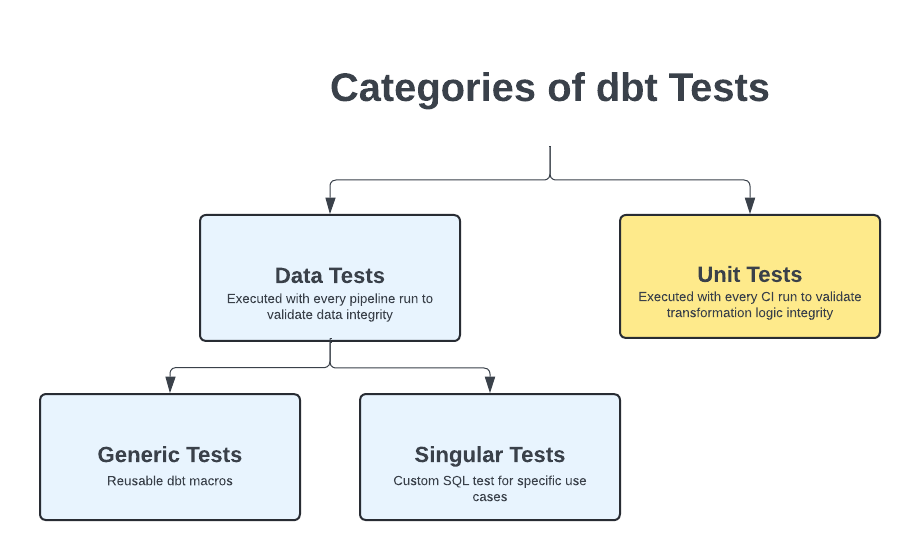
dbt Test Types Quick Reference
Generic Tests in dbt Core
dbt Core ships with four built-in generic tests that cover the most common data quality checks.
- **
unique** verifies that every value in a column contains no duplicates. Use this on identifiers likecustomer_idororder_idto catch accidental duplication in your models. not_nullchecks that a column contains no null values. This is especially useful for catching silent upstream failures where a field stops being populated.- **
accepted_values** validates that a column only contains values from a defined list. For example, apayment_statuscolumn might only allowpending,failed,accepted, orrejected. This test will catch it if a new value likeapprovedappears unexpectedly. - **
relationships** checks referential integrity between two tables. If anorderstable referencescustomer_id, this test verifies that everycustomer_idin orders has a matching record in thecustomerstable.
You apply generic tests by adding them to the model's property YAML file.
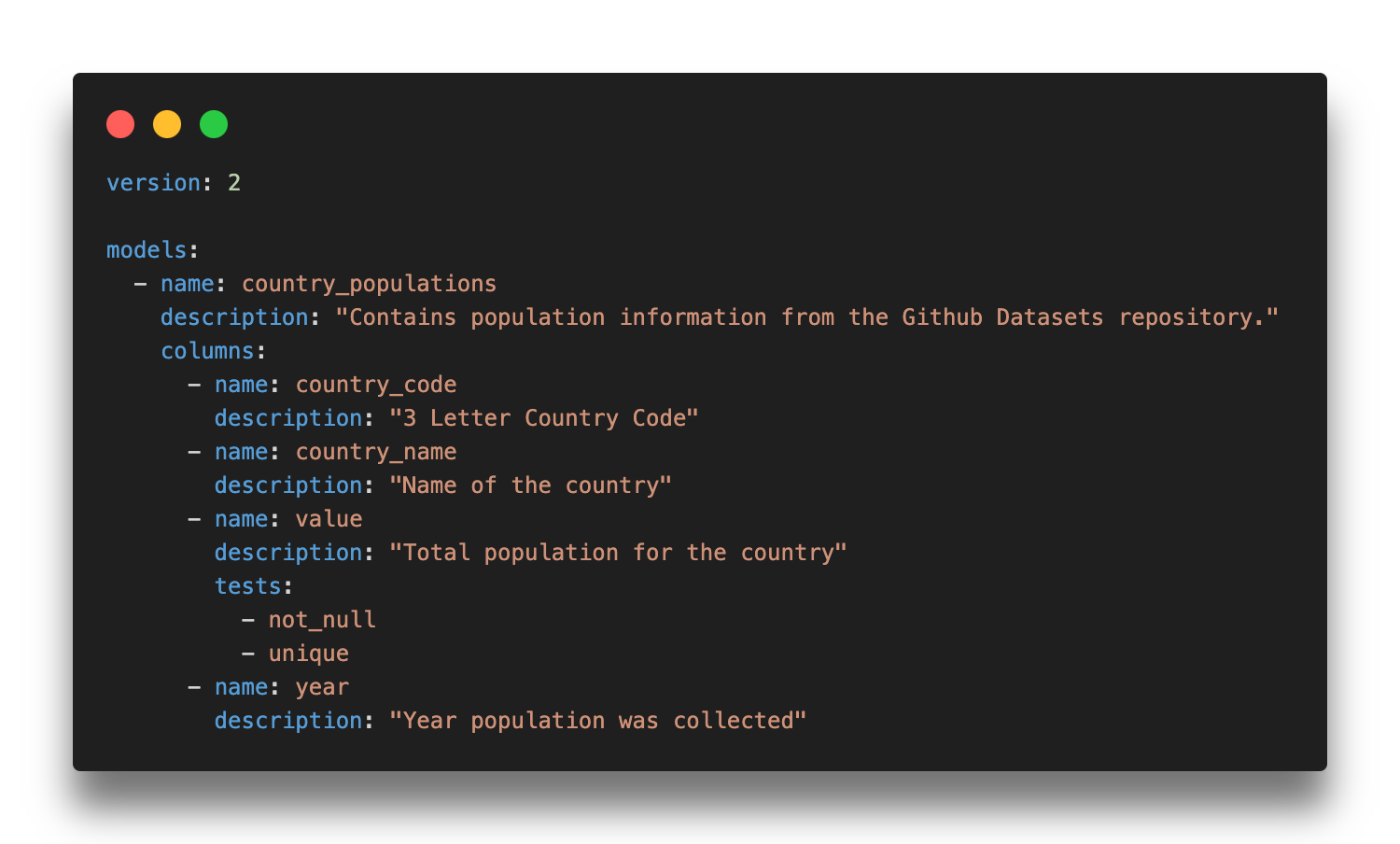
Generic tests also support additional configurations that give you more control over how and when they fail.
wherelimits the test to a subset of rows, useful on large tables where you want to test only recent data or exclude specific values.- **
severity** controls whether a test failure blocks execution. Set towarnto flag issues without stopping the pipeline, or keep the defaulterrorfor critical checks. - **
name** overrides the auto-generated test name. Since dbt generates long default names, a custom name makes logs and audit tables much easier to read.
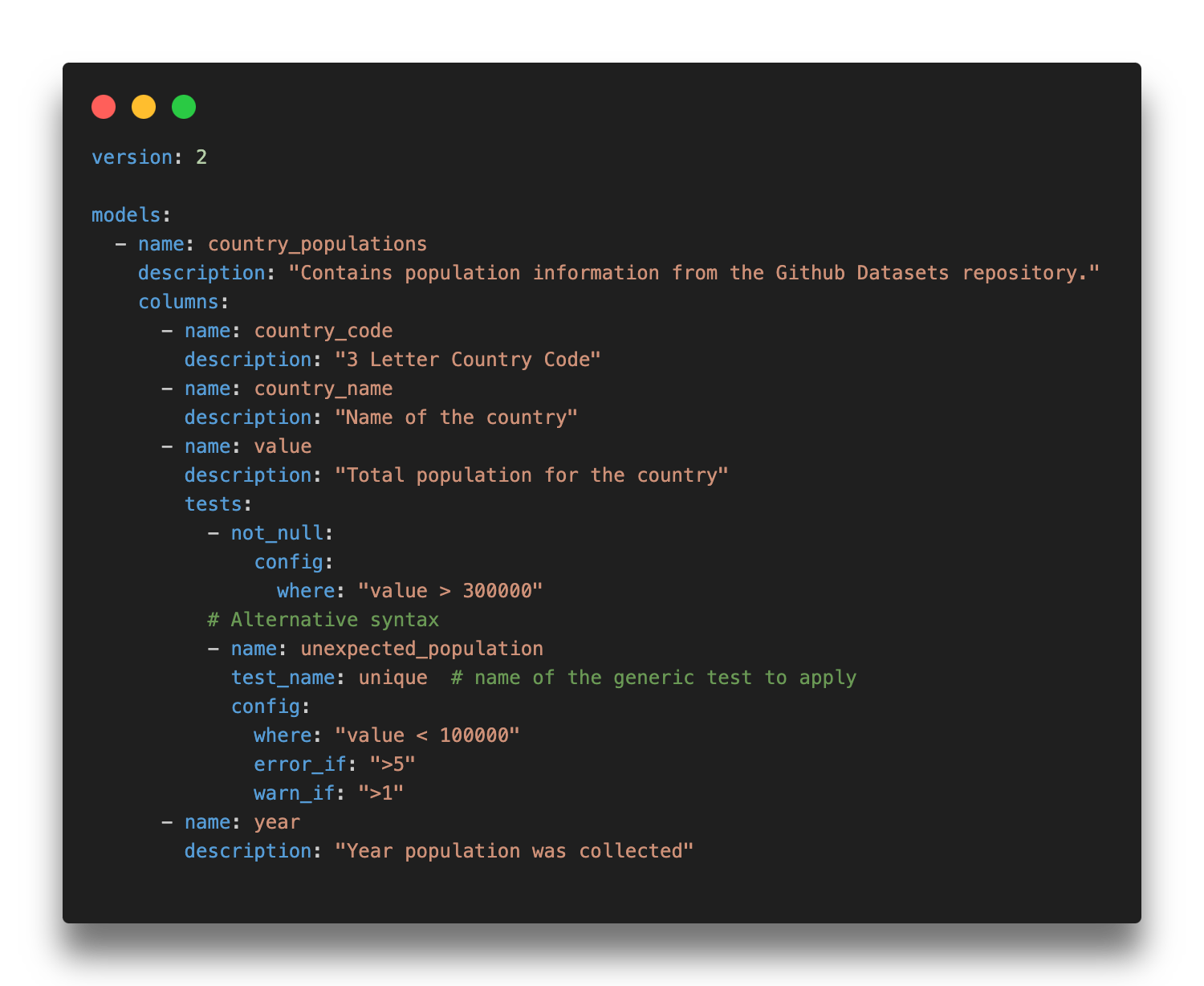
dbt tests with where condition, severity, and name defined
Singular Tests in dbt Core
Singular tests are custom SQL assertions saved in your tests/ directory. Each file contains a query that returns the rows failing the test. If the query returns any rows, dbt marks the test as failed.
Use singular tests when built-in generic tests or package tests do not cover your specific business logic. A good example: verifying that sales for one product stay within +/- 10% of another product over a given period. That kind of assertion is too specific for a reusable generic test but straightforward to express in SQL.
When you find yourself writing similar singular tests repeatedly across models, that is a signal to convert the logic into a custom generic test instead.
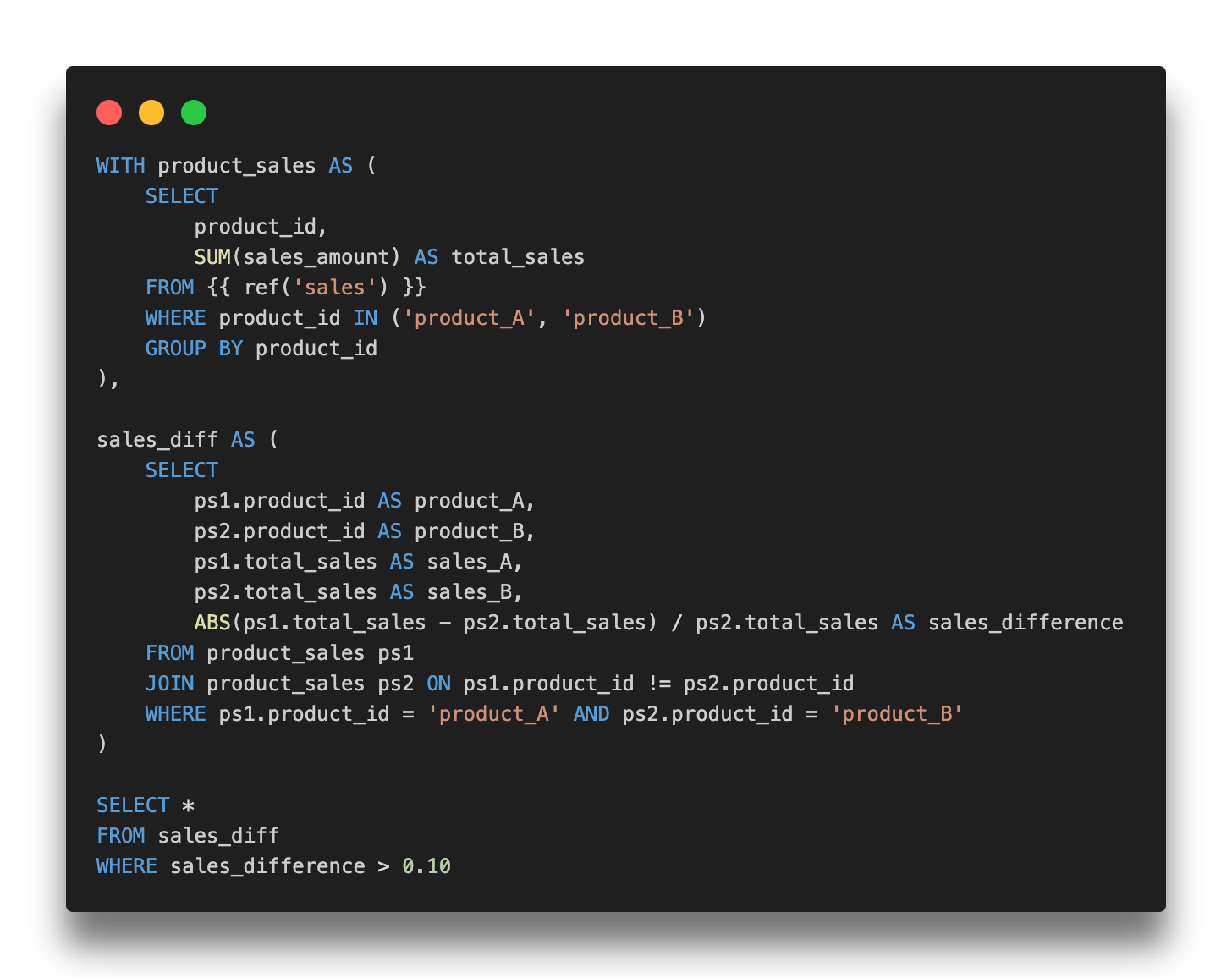
Custom Generic Tests in dbt Core
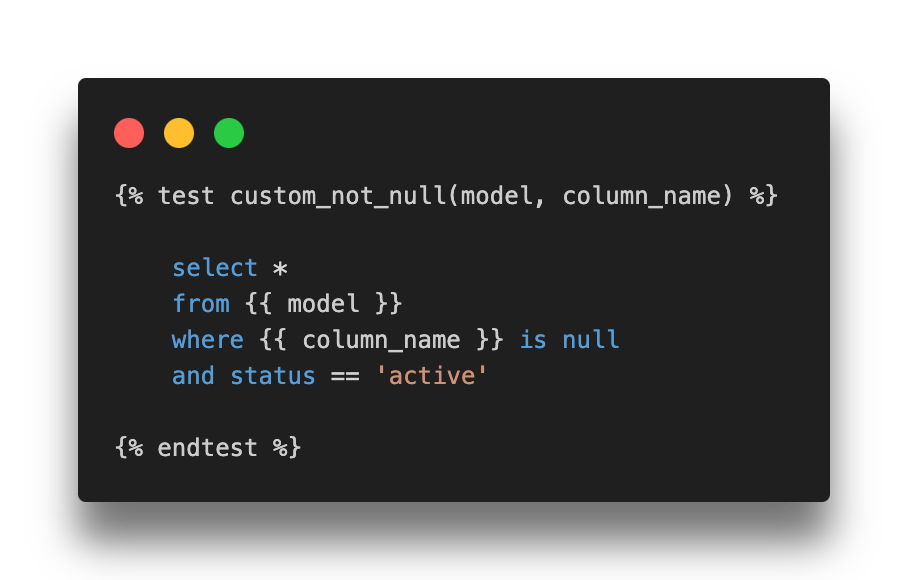
Custom generic tests work like dbt macros. They can be stored in tests/generic/ or in your macros/ directory. Datacoves recommends tests/generic/ as the default location, but macros/ makes more sense when the test depends on complex macro logic. At minimum, a custom generic test accepts a model parameter, with an optional column_name if the test applies to a specific column. Additional parameters can be passed to make the test more flexible.
Once defined, a custom generic test can be applied across any model or column in your project, just like the built-in tests. This makes them the right choice when you have business logic that repeats across multiple models but is too specific to find in a community package.
Unit Tests in dbt Core (dbt 1.8+)
Unit tests, available natively since dbt 1.8, validate that your SQL transformation logic produces the expected output before data reaches production.
Unlike data tests that run against live warehouse data on every pipeline execution, unit tests use static, predefined inputs defined as inline values, seeds, or SQL queries in your YAML config. Because the expected outputs don’t change between runs, there’s no value in running unit tests in production. Run them locally during development and in your CI pipeline when new transformation code is introduced.
If your project is on a version older than dbt 1.8, upgrading is the recommended path. Community packages that previously filled this gap (dbt-unit-testing, dbt_datamocktool, dbt-unittest) are no longer actively maintained and are not recommended for new projects.
Source Freshness Checks in dbt Core
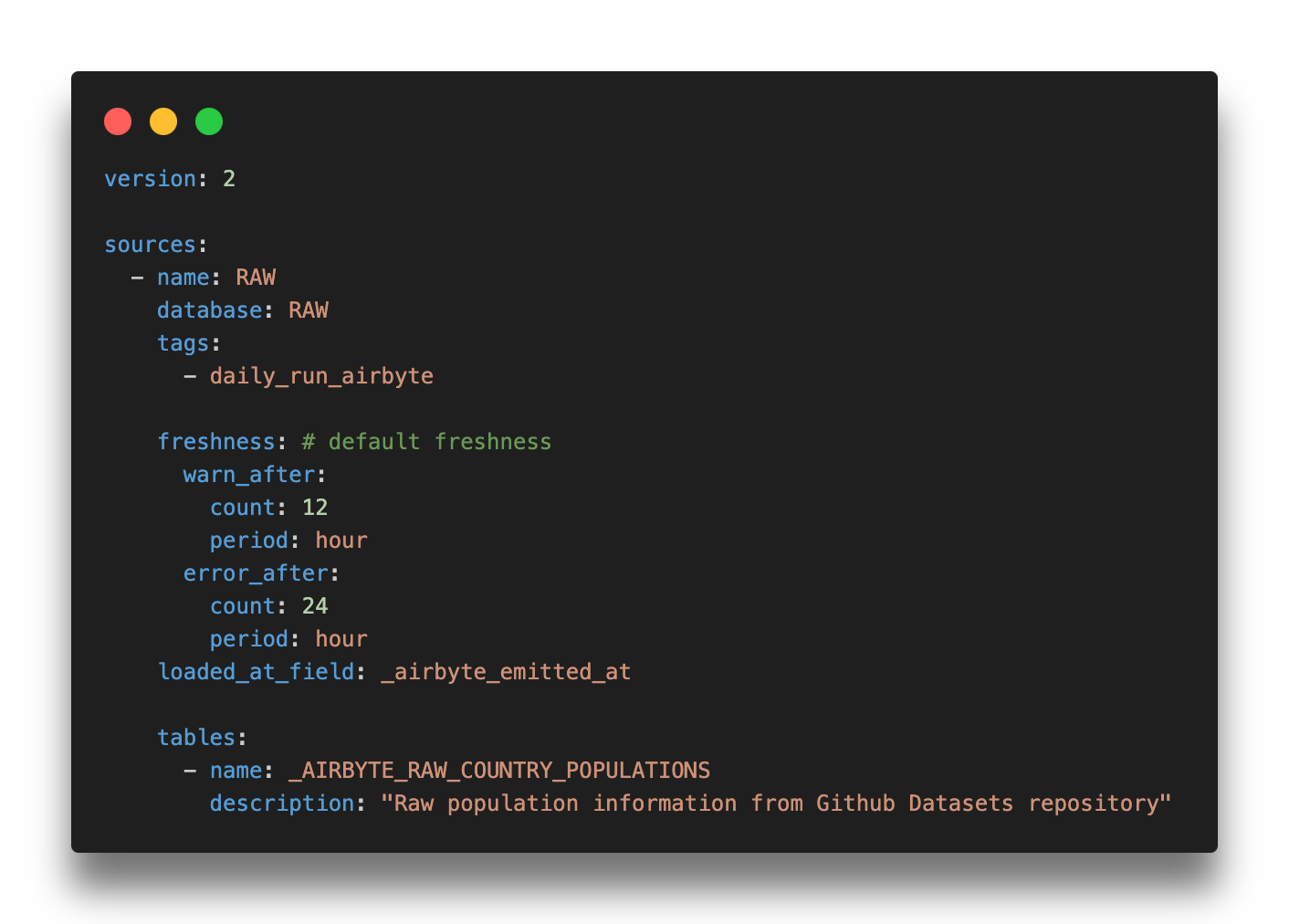
Source freshness checks aren’t technically dbt tests, but they solve one of the most common silent failure modes in data pipelines: a source stops updating, but the pipeline keeps running without any errors.
Freshness checks are configured in your sources.yml file with warn_after and error_after thresholds. When dbt detects that a source has not been updated within the defined window, it raises a warning or error before your models run. This is especially critical for time-sensitive reporting, where stale data can be worse than no data at all.
Get our free ebook dbt Cloud vs dbt Core
Comparing dbt Core and dbt Cloud? Download our eBook for insights on feature, pricing and total cost. Find the best fit for your business!
Get the PDF
dbt Testing Packages: Extending Beyond dbt Core
dbt Core's built-in tests cover the fundamentals, but the community has built a rich ecosystem of packages that extend testing well beyond what ships out of the box. Packages are installed via your packages.yml file and sourced from dbt Hub.
dbt-utils: 16 Additional Generic Tests
dbt-utils, maintained by dbt Labs, is the most widely used dbt testing package. It adds 16 generic tests alongside SQL generators and helper macros that complement dbt Core's built-in capabilities.
not_accepted_valuesis the inverse ofaccepted_values. Use it to assert that specific values are never present in a column.equal_rowcountconfirms that two tables have the same number of rows. This is particularly useful after transformation steps where row counts should be preserved.fewer_rows_thanvalidates that a target table has fewer rows than a source table, which is the expected result after any aggregation step.
For the full list of all 16 generic tests with usage examples, see the Datacoves dbt-utils cheatsheet.
dbt-expectations: 62 Tests Modeled After Great Expectations
dbt-expectations, maintained by Metaplane, ports the Python library Great Expectations into the dbt ecosystem. It gives analytics engineers 62 reusable generic tests without adding a separate tool to the stack.
The package covers seven categories:
- Table shape (15 tests)
- Missing values, unique values, and types (6 tests)
- Sets and ranges (5 tests)
- String matching (10 tests)
- Aggregate functions (17 tests)
- Multi-column (6 tests)
- Distributional functions (3 tests)
The string matching and aggregate function categories in particular cover validations that would otherwise require custom singular tests. Full documentation is available on the dbt-expectations GitHub repository.
dbt_constraints: Enforce Primary and Foreign Keys
dbt_constraints, created by Snowflake, generates database-level primary key, unique key, and foreign key constraints directly from your existing dbt tests. It is primarily designed for Snowflake, with limited support on other platforms.
When added to a project, it automatically creates three types of constraints.
- A primary_key is a unique, not-null constraint on one or more columns.
- A unique_key is a uniqueness constraint, including support for composite keys via
dbt_utils.unique_combination_of_columns. - A foreign_key is a referential integrity constraint derived from existing
relationshipstests.
This package is most valuable for teams that want database constraints alongside dbt's test-based validation, not instead of it. Snowflake doesn’t enforce most constraints at write time, but the query optimizer uses them for better execution plans. Some tools also read constraints to reverse-engineer data model diagrams or add joins automatically between tables.
For most dbt projects, dbt-utils and dbt-expectations are the two packages worth adding first. Layer in dbt_constraints when your use case specifically calls for database-level constraints on Snowflake.
Storing and Reviewing dbt Test Results
By default, dbt doesn’t persist test results between runs. You can change this by setting store_failures: true in your dbt_project.yml or at the individual test level.
This is useful for spot-checking failures after a run, but each execution overwrites the previous results, so it does not give you historical visibility into data quality trends over time. The tools below address that gap with lightweight reporting options.
Using store_failures to Capture Failing Records
When store_failures: true is enabled at the project or test level, dbt writes the rows that fail each test into tables in your warehouse under a schema named [your_schema]_dbt_test__audit. This creates one table per test, containing the actual records that triggered the failure.
This is a practical first step for teams that want to inspect failures without setting up a dedicated observability platform. The main limitation: each run overwrites the previous results, so you cannot track failure trends over time without additional tooling.
Datacoves recommends dbt audit tables in a separate database to keep your production environment clean. On platforms like Snowflake, this also reduces overhead for operations like database cloning.
dq-tools: Visualize dbt Test Results in Your BI Dashboard
dq-tools stores dbt test results and makes them available for visualization in a BI dashboard. If your team already has a BI layer in place, this is a lightweight way to surface data quality metrics alongside existing reporting without adding a separate observability tool.
datacompy: Table-Level Validation for Data Migration
datacompy is a Python library for migration validation. It performs detailed table comparisons, reporting on row-level differences, column mismatches, and statistical summaries. It’s not a dbt package, but it integrates naturally into migration workflows that use dbt for transformation.
Standard dbt tests aren’t designed for row-by-row comparison across systems, which makes datacompy a useful complement when you’re migrating from legacy platforms.
dbt Testing During Development and CI/CD
The tests covered so far validate data. The tools below validate your dbt project itself, catching governance and compliance issues at the development and PR stage rather than in production.
dbt-checkpoint: Pre-Commit Hooks for dbt Core Teams
dbt-checkpoint, maintained by Datacoves, enforces project governance standards automatically so teams don’t rely on manual code review to catch missing documentation, unnamed columns, or hardcoded table references. It runs as a pre-commit hook, blocking non-compliant code before it’s pushed to the main branch, and can also run in CI/CD pipelines to enforce the same checks on every pull request.
Out of the box it validates things like whether models and columns have descriptions, whether all columns defined in SQL are present in the corresponding YAML property file, and whether required tags or metadata are in place.
It's a natural fit for teams that want Git-native governance without additional infrastructure. The tradeoff: it requires familiarity with pre-commit configuration to set up and extend. Like all Python-based governance tools, it doesn't run inside the dbt Cloud IDE.
dbt-bouncer: Artifact-Based Convention Enforcement
dbt-bouncer, maintained by Xebia, takes an artifact-based approach, validating against manifest.json, catalog.json, and run_results.json rather than running as a pre-commit hook. It requires no direct database connection and can run in any CI/CD pipeline that has access to dbt artifacts. Checks cover naming patterns, directory structure, and description coverage, and it can run as a GitHub Action or standalone Python executable.
dbt-project-evaluator: DAG and Structure Linting from dbt Labs
dbt-project-evaluator, maintained by dbt Labs, takes a different approach. Rather than running as an external tool, it is a dbt package: it materializes your project's DAG structure into your warehouse and runs dbt tests against it.
It checks for DAG issues (model fanout, direct joins to sources, unused sources), testing and documentation coverage, naming convention violations, and performance problems like models that should be materialized differently.
The main limitation is adapter support: it works on BigQuery, Databricks, PostgreSQL, Redshift, and Snowflake, but not on Fabric or Synapse. Because it materializes models into your warehouse, it has a slightly higher execution cost than artifact-based tools.
dbt-score: Metadata Linting and Model Scoring
dbt-score, maintained by Picnic Technologies, is a Python-based CLI linter that reads your manifest.json and assigns each model a score from 0 to 10 based on metadata quality: missing descriptions, absent owners, undocumented columns, models without tests.
The scoring approach makes it easy to track improvement over time and prioritize which models need attention, without enforcing hard pass/fail gates on every PR. Custom rules are fully supported. It requires no database connection and no dbt run, just a manifest.json.
How to Choose a dbt CI/CD Governance Tool
These tools aren’t mutually exclusive, and many teams combine them. For dbt Core teams, dbt-checkpoint is the recommended starting point: it enforces governance at the PR stage with minimal setup and can run both locally and in CI/CD pipelines. dbt-bouncer is worth evaluating if your team wants artifact-based validation running in an external CI/CD pipeline. Add dbt-project-evaluator when you want DAG-level structural checks alongside documentation and testing coverage. Layer in dbt-score for ongoing visibility into metadata quality across your project without hard enforcement gates.
Where to Start With dbt Testing
A Practical Progression from First Tests to Full Governance
dbt testing isn’t an all-or-nothing investment. The most effective approach is to start with what ships in dbt Core and expand coverage as your team builds confidence.
A practical progression looks like this: start with unique, not_null, and relationships tests on source tables and mart models. Add dbt-utils and dbt-expectations as your testing needs grow beyond the basics. When your team is ready to enforce governance and metadata standards, dbt-checkpoint is the simplest starting point for dbt Core teams, with dbt-project-evaluator and dbt-score as complementary layers.
If your organization is still running transformations in legacy tools like Talend, Informatica, or Python, you do not need to wait for a full migration to start benefiting from dbt testing. dbt sources can point to any table in your warehouse, whether or not dbt created it, so you can layer dbt tests and documentation on top of your existing pipeline today. See Using dbt to Document and Test Data Transformed with Other Tools for a step-by-step walkthrough.
Where teams hit friction isn’t usually the tests themselves. It’s managing the infrastructure, environments, CI/CD pipelines, and orchestration around them. Datacoves handles that layer, giving your team a managed dbt and Airflow environment so they can focus on building and testing models rather than maintaining tooling. Learn more about how Datacoves compares to other dbt solutions.