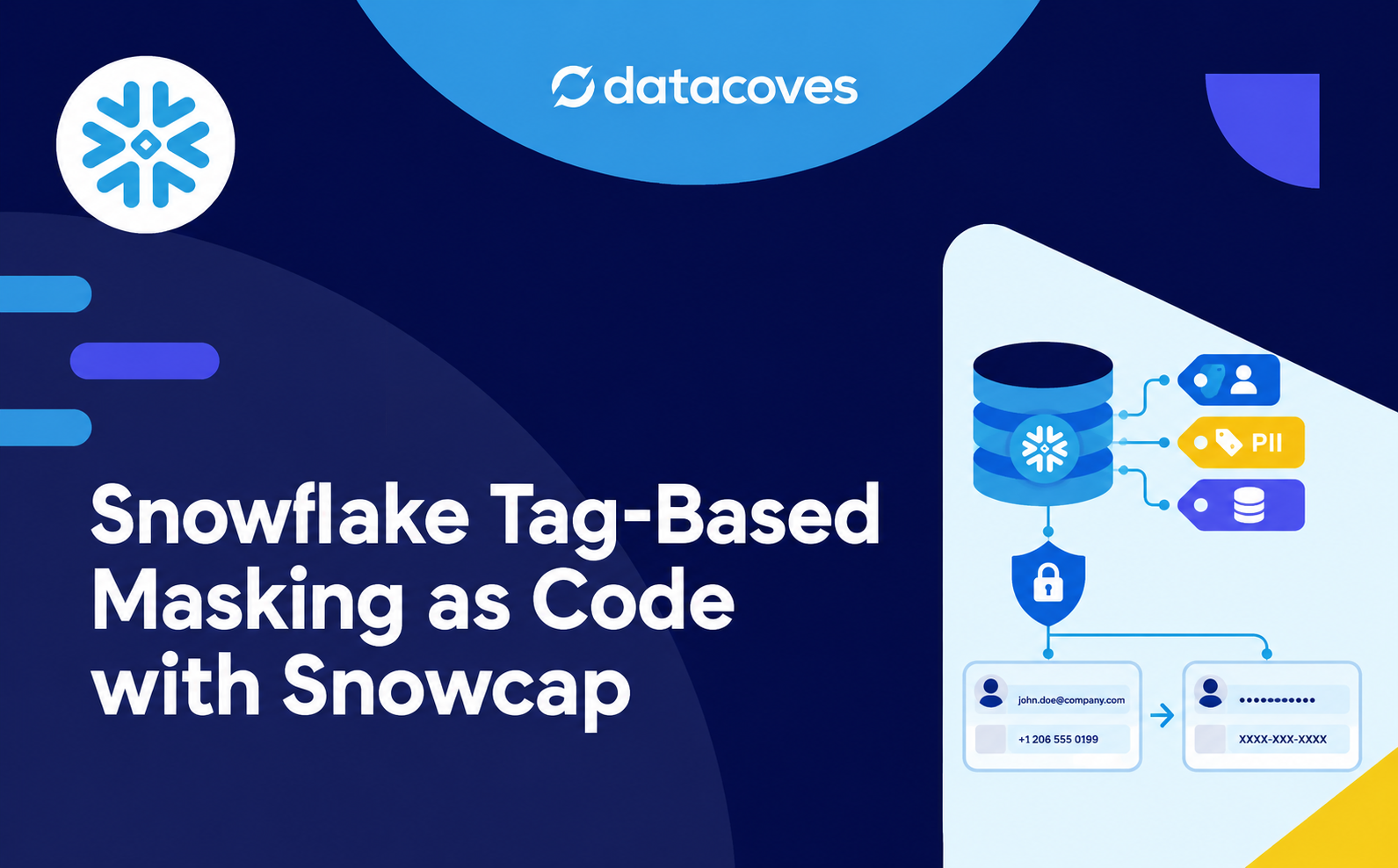
- Tag-based masking in Snowflake attaches masking policies to a tag instead of to individual columns. Tag a column
pii, and Snowflake applies the policy that matches its data type. It requires Enterprise Edition or higher. - A tag needs one masking policy for each data type you use. If a tagged column’s data type has no matching policy, the column isn’t masked, and Snowflake doesn’t raise an error.
- With Snowcap, the tag, the masking policies, the tag-to-policy references, and the unmask roles are all declared in YAML and deployed with
uvx snowcap plananduvx snowcap apply. The list of who can see PII lives in Git. - Grant unmask roles to functional roles, never directly to users. Set
DEFAULT_SECONDARY_ROLES = ()for masked users, because secondary roles can put an unmask role in the session and return real values. - Tagging columns one at a time is fail-open: a column nobody tagged stays readable. Automate tagging in your load and transformation pipeline, or tag a whole sensitive schema so new columns are masked by default.
To set up tag-based masking in Snowflake with Snowcap, declare a tag like pii, a masking policy for each data type, and an unmask role in YAML, then attach every policy to the tag. Preview with uvx snowcap plan and deploy with uvx snowcap apply. After that, tagging a column pii masks it automatically, and only roles holding the unmask role see the real values.
This post builds that setup and proves it works. You’ll create one tag, five masking policies (one each for strings, numbers, floats, dates, and timestamps), and a z_unmask__pii role granted to a second analyst role. Then you’ll tag columns by hand and query them as two kinds of analyst: analyst gets back ***MASKED***, and analyst_pii gets the actual email address.
New to Snowcap? Start with Introducing Snowcap: Snowflake Infrastructure as Code, Done Right, then How to Install Snowcap and Create Your First Snowflake Warehouse. This post also builds on Manage Snowflake RBAC as Code with Snowcap. The unmask role plugs into that same role hierarchy, so read that one first if object roles and functional roles are new to you.
Before you start: masking policies require Snowflake Enterprise Edition or higher. Check your account edition before going further.
One change from the earlier posts: from here on, every command uses uvx, uv‘s tool runner, so there’s nothing to install. If you set up Snowcap with pip in a virtual environment, drop the prefix and run snowcap plan and snowcap apply as before.
Why Tag-Based Masking Instead of Per-Column Policies?
Snowflake lets you attach a masking policy directly to a column. For a handful of columns, that’s the simplest option. The problem is scale: every sensitive column needs its own policy attachment, so every new table with PII means another round of attaching policies, one column at a time.
Tag-based masking moves the decision from the column to the classification. Tag a column as pii, and the masking comes with it. Here’s why we recommend it:
- New tables only need a tag. Add a table with PII columns, tag them, and masking is enforced. The policies stay as they are.
- Masking logic lives in one place. Change a policy once, and the change applies to every column carrying the tag.
- Tagging ignores data types. One
piitag covers strings, numbers, and dates. Snowflake picks the matching policy for each column. - Governance and engineering work separately. Governance teams own the classifications. Data engineers build the tables and apply the tags.
- Sensitivity is recorded on the data itself. A tag on a column documents what that column holds.
- Access fits the hierarchy you already have. Unmask roles are ordinary roles, so they plug into your existing RBAC setup.
Choose direct column masking if you only have a few columns to protect. Choose tag-based masking for everything else; it’s the right default for most teams. Either way, use only one mechanism per column. Mixing them causes the precedence problem covered in the caveats.
The cost is that initial setup: a tag, a policy for each data type, the references between them, and the unmask roles. Snowcap turns that setup into a few YAML files you review in a pull request. It also answers the question from the RBAC post: when compliance asks who can see PII, the answer is in Git: every role granted z_unmask__pii, and every user holding one of those roles.
Get our free ebook dbt Cloud vs dbt Core
Comparing dbt Core and dbt Cloud? Download our eBook for insights on feature, pricing and total cost. Find the best fit for your business!
Get the PDF
How Does Tag-Based Masking Work in Snowflake?
Tag-based masking has four pieces, and each one does a single job:
Once the pieces are connected, you tag a column and Snowflake handles the rest.
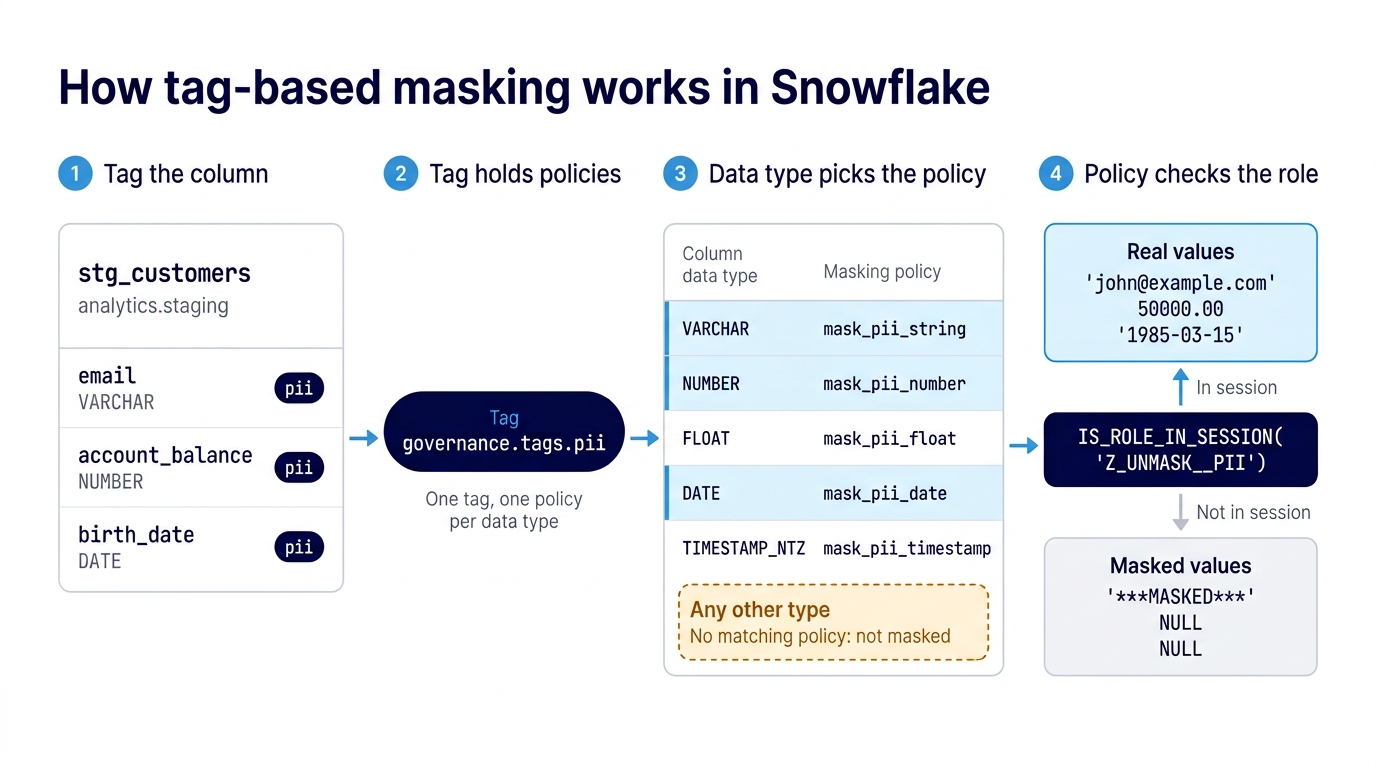
Every policy in this setup checks for the same role. Each one calls IS_ROLE_IN_SESSION('Z_UNMASK__PII'). If the querying session holds that role, the real value comes back. If it doesn’t, the policy returns a masked value instead.
What makes this scale is how Snowflake picks the policy. A tag can carry several masking policies, one for each data type. Tag a VARCHAR column as pii, and the string policy applies. Tag a NUMBER column as pii, and the number policy applies. Whoever tags the column never has to think about data types.
Tag-based masking in Snowflake attaches masking policies to a tag, so any column carrying that tag is masked by the policy that matches its data type. There’s no policy to attach to the column and no data type to choose.
That convenience has one sharp edge. If a column’s data type has no matching policy on the tag, the column isn’t masked, and nothing warns you. Audit the data types in your tables before the first tag goes on, and give each one a policy. The examples in this post cover VARCHAR, NUMBER, FLOAT, DATE, and TIMESTAMP_NTZ.
Build the Masking Setup in YAML
The RBAC post ended by splitting the config across files, so this post starts there. The masking setup adds four new files to resources/ and adds entries to three you already have:
snowcap/
├── resources/
│   ├── databases.yml            # + governance DB
│   ├── schemas.yml              # + governance schemas
│   ├── warehouses.yml
│   ├── stages.yml
│   ├── roles__base.yml
│   ├── roles__functional.yml
│   ├── roles__unmasking.yml     # new: unmask roles
│   ├── tags.yml                 # new: tags + grants
│   ├── masking_policies.yml     # new: policy per type
│   ├── tag_masking_policies.yml # new: tag-policy refs
│   ├── users.yml                # + analyst_pii grant
│   └── object_templates/
│       ├── database.yml
│       ├── schema.yml
│       └── warehouses.yml
├── plan.sh
├── apply.sh
└── .env.sample
You still point Snowcap at the resources/ directory, so the new files get picked up on the next plan.
Create the Governance Database and Schemas
Start with a dedicated location for governance objects: a governance database with one schema for tags and one for policies.
# resources/databases.yml
databases:
  - name: governance
    owner: sysadmin
# resources/schemas.yml
schemas:
- name: governance.tags
managed_access: true
- name: governance.policies
managed_access: trueBoth schemas use managed_access: true. As covered in the RBAC post, managed access moves grant authority to the schema owner, so whoever owns an object inside the schema can’t grant privileges on it outside your role hierarchy.
Create the PII Tag
# resources/tags.yml
tags:
  - name: governance.tags.pii
    comment: Personally Identifiable Information
    propagate: ON_DATA_MOVEMENT

roles:
  - name: z_tag__apply__pii

grants:
  - priv: APPLY
    on: tag governance.tags.pii
    to: z_tag__apply__pii
This file declares three things. The pii tag is the classification you’ll put on columns. The z_tag__apply__pii role is the one that carries the APPLY privilege on that tag. The grant connects them, because a role needs APPLY before it can set the tag on a column. That role isn’t granted to anyone yet. Once you automate tagging, it goes to the loader and dbt roles that apply the tag. Snowcap’s Tag reference lists every available property.
propagate: ON_DATA_MOVEMENT carries the tag downstream. When data from a tagged column flows into a new table or view through CTAS or INSERT...SELECT, the tag goes with it, and so does the masking. There’s one exception: a column derived by a transformation, like a hash or a concatenation, breaks the lineage Snowflake uses to propagate tags. Those columns need their own tag.
Create the Unmask Role
# resources/roles__unmasking.yml
roles:
  - name: z_unmask__pii
    comment: Grants access to unmasked PII data
This role has no privileges attached. The masking policies check for it by name, and that check decides who sees real values.
The z_ prefix follows the convention from the RBAC post. It sorts these roles to the bottom of role lists, so the functional roles stay easy to find.
Create One Masking Policy per Data Type
Each policy receives the column value, checks for the unmask role, and returns either the real value or a masked one. The five policies follow the same structure. Only the data type and the masked value change. Snowcap’s Masking Policy reference covers the full syntax.
# resources/masking_policies.yml
masking_policies:
# String/VARCHAR columns
- name: governance.policies.mask_pii_string
args:
- name: val
data_type: VARCHAR
returns: VARCHAR
body: |-
CASE
WHEN IS_ROLE_IN_SESSION('Z_UNMASK__PII')
THEN val
ELSE '***MASKED***'
END
comment: Masks PII string data
# Numeric columns
- name: governance.policies.mask_pii_number
args:
- name: val
data_type: NUMBER
returns: NUMBER
body: |-
CASE
WHEN IS_ROLE_IN_SESSION('Z_UNMASK__PII')
THEN val
ELSE NULL
END
comment: Masks PII numeric data
# Float columns
- name: governance.policies.mask_pii_float
args:
- name: val
data_type: FLOAT
returns: FLOAT
body: |-
CASE
WHEN IS_ROLE_IN_SESSION('Z_UNMASK__PII')
THEN val
ELSE NULL
END
comment: Masks PII float data
# Date columns
- name: governance.policies.mask_pii_date
args:
- name: val
data_type: DATE
returns: DATE
body: |-
CASE
WHEN IS_ROLE_IN_SESSION('Z_UNMASK__PII')
THEN val
ELSE NULL
END
comment: Masks PII date data
# Timestamp columns
- name: governance.policies.mask_pii_timestamp
args:
- name: val
data_type: TIMESTAMP_NTZ
returns: TIMESTAMP_NTZ
body: |-
CASE
WHEN IS_ROLE_IN_SESSION('Z_UNMASK__PII')
THEN val
ELSE NULL
END
comment: Masks PII timestamp dataEach policy returns the same data type it receives (look at args and returns), which is why only the string policy can return a masked label:
If your tables use a data type that isn’t in this table, add a policy for it in the same format.
Attach Every Policy to the Tag
# resources/tag_masking_policies.yml
tag_masking_policy_references:
  - tag_name: governance.tags.pii
    masking_policy_name: governance.policies.mask_pii_string

  - tag_name: governance.tags.pii
    masking_policy_name: governance.policies.mask_pii_number

  - tag_name: governance.tags.pii
    masking_policy_name: governance.policies.mask_pii_float

  - tag_name: governance.tags.pii
    masking_policy_name: governance.policies.mask_pii_date

  - tag_name: governance.tags.pii
    masking_policy_name: governance.policies.mask_pii_timestamp
This file connects everything: one tag with five references. Snowflake attaches all five policies to pii and applies the one that matches each column’s data type. A tag can hold only one policy per data type, which is why every policy above covers a different type. See Snowcap’s Tag Masking Policy Reference for details.
Grant the Unmask Role to a Functional Role
The last piece decides who sees real values. In this walkthrough, that’s a second analyst role called analyst_pii: everything analyst can do, plus the ability to read unmasked PII.
Rather than rebuilding the analyst’s object access, grant the analyst role itself and layer the unmask role on top. The two roles cannot drift apart that way. Whatever analyst gains later, analyst_pii gains too.
Both the new role and the grant go in roles__unmasking.yml, the file you started earlier. Here it is complete:
# resources/roles__unmasking.yml
roles:
  - name: z_unmask__pii
    comment: Grants access to unmasked PII data

  - name: analyst_pii
    comment: Analyst who can also read unmasked PII

role_grants:
  - to_role: analyst_pii
    roles:
      - analyst        # everything an analyst can do
      - z_unmask__pii  # plus reading unmasked PII
Grant unmask roles to functional roles, never directly to users. That’s the same rule from the RBAC post, and it matters more here. One file now holds the whole PII access story: the unmask role, the analyst role that carries it, and the grant that connects them.
Finally, grant analyst_pii to your user in place of analyst. Substitute your own Snowflake username:
# resources/users.yml
# Update your existing entry
role_grants:
  - to_user: fmercado
    roles:
      - analyst_pii
analyst_pii already contains analyst, so you can still run USE ROLE analyst to see the masked side of the demo. Removing analyst from the file doesn’t revoke the grant from the RBAC post unless you apply with --sync_resources role_grant, and the demo works the same either way.
Plan and Apply the Masking Config
The loop is the same as in the earlier posts: plan, read, apply. Before you run it, check which role Snowcap will use.
This config touches more resource types than the RBAC post did. It creates a database and schemas, roles, grants, and role grants, plus tags, masking policies, and tag-to-policy references. Snowcap runs USE SECONDARY ROLES ALL and uses whichever of your user’s roles each operation requires, so your user needs privileges covering all of them.
Masking adds privileges that roles and grants didn’t need. Creating the objects takes the schema-level CREATE TAG and CREATE MASKING POLICY privileges, and attaching policies to a tag takes the global APPLY MASKING POLICY privilege. Because the pii tag sets propagate, the role that creates it also needs the global APPLY TAG privilege; Snowflake only lets the tag’s owner turn propagation on.
USE ROLE ACCOUNTADMIN;
CREATE ROLE IF NOT EXISTS masking_admin;
GRANT APPLY MASKING POLICY ON ACCOUNT TO ROLE masking_admin;
GRANT APPLY TAG ON ACCOUNT TO ROLE masking_admin;
GRANT APPLY TAG ON ACCOUNT TO ROLE SYSADMIN;
-- Your user (SNOWFLAKE_USER in .env)
GRANT ROLE masking_admin TO USER fmercado;
The last grant matters. Snowcap only uses roles granted to your user, so masking_admin does nothing until you hold it. Substitute your own Snowflake username.
Load your credentials first, the same way as in the getting-started post (export $(cat .env | xargs) on macOS or Linux), or use your plan.sh script. Your .env also needs SNOWFLAKE_WAREHOUSE set for this config. Snowcap reads the tag-to-policy references through a table function, which needs a running warehouse; the rest of a plan is metadata only. Then preview the change:
uvx snowcap plan --config resources/» snowcap
» Plan: 24 to create, 0 to update, 0 to transfer, 0 to drop.
━━━ ROLES ━━━━━━━━━━━━━━━━
+ CREATE: ANALYST_PII (owner: USERADMIN)
+ CREATE: Z_TAG__APPLY__PII (owner: USERADMIN)
+ CREATE: Z_UNMASK__PII (owner: USERADMIN)
━━━ DATABASES ━━━━━━━━━━━━
+ CREATE: GOVERNANCE (owner: SYSADMIN)
━━━ SCHEMAS ━━━━━━━━━━━━━━
+ CREATE: GOVERNANCE.TAGS (owner: SYSADMIN)
+ CREATE: GOVERNANCE.POLICIES (owner: SYSADMIN)
━━━ MASKING_POLICYS ━━━━━━━━
+ CREATE: GOVERNANCE.POLICIES.MASK_PII_TIMESTAMP (owner: SYSADMIN)
+ CREATE: GOVERNANCE.POLICIES.MASK_PII_FLOAT (owner: SYSADMIN)
+ CREATE: GOVERNANCE.POLICIES.MASK_PII_STRING (owner: SYSADMIN)
+ CREATE: GOVERNANCE.POLICIES.MASK_PII_NUMBER (owner: SYSADMIN)
+ CREATE: GOVERNANCE.POLICIES.MASK_PII_DATE (owner: SYSADMIN)
━━━ TAGS ━━━━━━━━━━━━━━━
+ CREATE: GOVERNANCE.TAGS.PII (owner: SYSADMIN)
━━━ TAG_MASKING_POLICY_REFERENCES ━━━━━━━
+ CREATE: GOVERNANCE.TAGS.PII (masking_policy=governance.policies.mask_pii_number)
+ CREATE: GOVERNANCE.TAGS.PII (masking_policy=governance.policies.mask_pii_timestamp)
+ CREATE: GOVERNANCE.TAGS.PII (masking_policy=governance.policies.mask_pii_float)
+ CREATE: GOVERNANCE.TAGS.PII (masking_policy=governance.policies.mask_pii_date)
+ CREATE: GOVERNANCE.TAGS.PII (masking_policy=governance.policies.mask_pii_string)
━━━ GRANTS ━━━━━━━━━━━━━━━
+ CREATE: SELECT on ALL VIEWS in DATABASE.ANALYTICS → ROLE.Z_TABLES_VIEWS__SELECT__ANALYTICS
+ CREATE: APPLY on TAG.GOVERNANCE.TAGS.PII → ROLE.Z_TAG__APPLY__PII
+ CREATE: SELECT on ALL TABLES in DATABASE.ANALYTICS → ROLE.Z_TABLES_VIEWS__SELECT__ANALYTICS
+ CREATE: USAGE on ALL SCHEMAS in DATABASE.ANALYTICS → ROLE.Z_SCHEMAS__USAGE__ANALYTICS
Note: "ALL" grants always appear in the plan because Snowflake converts them
to individual object grants. They are idempotent and safe to apply.
━━━ ROLE_GRANTS ━━━━━━━━━━━━
+ CREATE: ROLE.ANALYST_PII → USER.FMERCADO
+ CREATE: ROLE.Z_UNMASK__PII → ROLE.ANALYST_PII
+ CREATE: ROLE.ANALYST → ROLE.ANALYST_PIICheck the plan against what you declared. You should see:
- The
governancedatabase with itstagsandpoliciesschemas - The
piitag - Five masking policies, one per data type
- Five tag-to-policy references, all pointing at
pii - Three new roles:
z_tag__apply__pii,z_unmask__pii, andanalyst_pii - The
APPLYgrant on the tag - The role grants that give
analyst_piitheanalystrole and the unmask role, and give your useranalyst_pii
You don’t have to order any of this yourself. Snowcap sequences the SQL so dependencies are created first.
If resources/ still holds your RBAC config, its ALL grants will show up in the plan again. That’s the same behavior the RBAC post covered: Snowcap can’t compare ALL grants, so it reissues them every run.
One more check if you use the plan.sh and apply.sh scripts from the RBAC post. If they pass --sync_resources role,grant,role_grant, any role, grant, or role grant in Snowflake that isn’t declared in resources/ gets dropped. Read the drop count before you apply.
When the plan looks right, deploy it:
uvx snowcap apply --config resources/» snowcap
» Plan: 24 to create, 0 to update, 0 to transfer, 0 to drop.
━━━ ROLES ━━━━━━━━━━━━━━━━━━
+ CREATE: ANALYST_PII (owner: USERADMIN)
+ CREATE: Z_UNMASK__PII (owner: USERADMIN)
+ CREATE: Z_TAG__APPLY__PII (owner: USERADMIN)
━━━ DATABASES ━━━━━━━━━━━━━━
+ CREATE: GOVERNANCE (owner: SYSADMIN)
━━━ SCHEMAS ━━━━━━━━━━━━━━
+ CREATE: GOVERNANCE.TAGS (owner: SYSADMIN)
+ CREATE: GOVERNANCE.POLICIES (owner: SYSADMIN)
━━━ MASKING_POLICYS ━━━━━━━━━
+ CREATE: GOVERNANCE.POLICIES.MASK_PII_STRING (owner: SYSADMIN)
+ CREATE: GOVERNANCE.POLICIES.MASK_PII_TIMESTAMP (owner: SYSADMIN)
+ CREATE: GOVERNANCE.POLICIES.MASK_PII_NUMBER (owner: SYSADMIN)
+ CREATE: GOVERNANCE.POLICIES.MASK_PII_DATE (owner: SYSADMIN)
+ CREATE: GOVERNANCE.POLICIES.MASK_PII_FLOAT (owner: SYSADMIN)
━━━ TAGS ━━━━━━━━━━━━━━━━━━
+ CREATE: GOVERNANCE.TAGS.PII (owner: SYSADMIN)
━━━ TAG_MASKING_POLICY_REFERENCES ━━━━
+ CREATE: GOVERNANCE.TAGS.PII (masking_policy=governance.policies.mask_pii_number)
+ CREATE: GOVERNANCE.TAGS.PII (masking_policy=governance.policies.mask_pii_timestamp)
+ CREATE: GOVERNANCE.TAGS.PII (masking_policy=governance.policies.mask_pii_string)
+ CREATE: GOVERNANCE.TAGS.PII (masking_policy=governance.policies.mask_pii_float)
+ CREATE: GOVERNANCE.TAGS.PII (masking_policy=governance.policies.mask_pii_date)
━━━ GRANTS ━━━━━━━━━━━━━━━━━
+ CREATE: APPLY on TAG.GOVERNANCE.TAGS.PII → ROLE.Z_TAG__APPLY__PII
+ CREATE: SELECT on ALL VIEWS in DATABASE.ANALYTICS → ROLE.Z_TABLES_VIEWS__SELECT__ANALYTICS
+ CREATE: SELECT on ALL TABLES in DATABASE.ANALYTICS → ROLE.Z_TABLES_VIEWS__SELECT__ANALYTICS
+ CREATE: USAGE on ALL SCHEMAS in DATABASE.ANALYTICS → ROLE.Z_SCHEMAS__USAGE__ANALYTICS
Note: "ALL" grants always appear in the plan because Snowflake converts them
to individual object grants. They are idempotent and safe to apply.
━━━ ROLE_GRANTS ━━━━━━━━━━━━
+ CREATE: ROLE.Z_UNMASK__PII → ROLE.ANALYST_PII
+ CREATE: ROLE.ANALYST_PII → USER.FMERCADO
+ CREATE: ROLE.ANALYST → ROLE.ANALYST_PII
[FMERCADO:SECURITYADMIN] > SHOW DATABASES (4 rows, 0.25s)
» Applied: 24 created, 0 updated, 0 transferred, 0 dropped.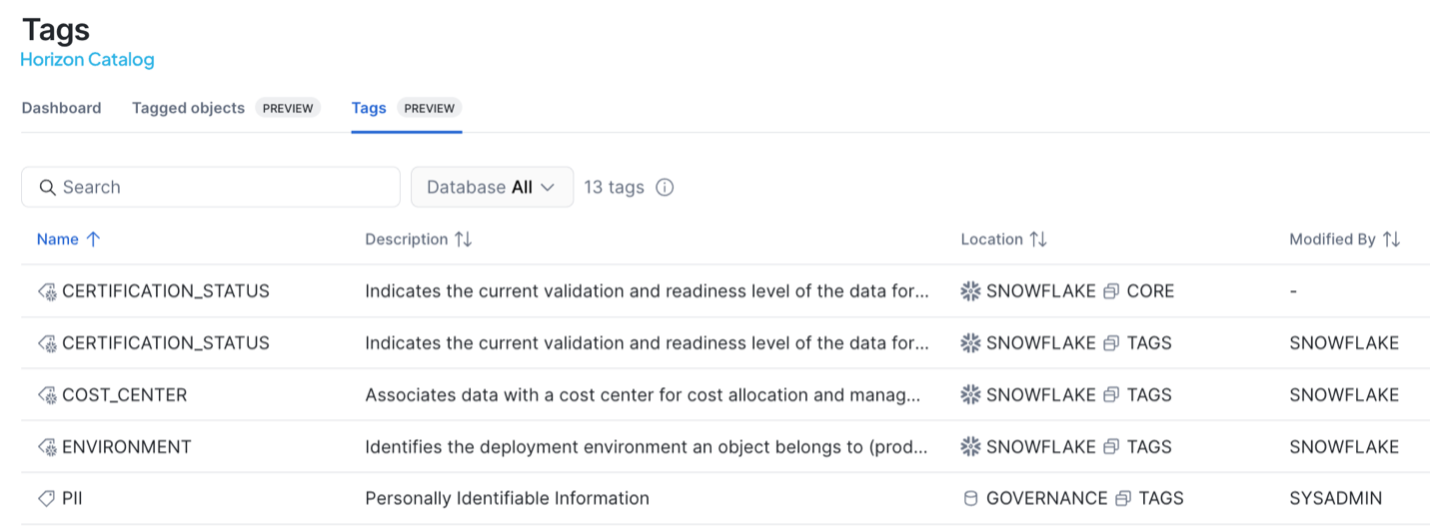
The masking system now exists in your account, but no data is masked yet, because no column carries the pii tag.
Tag Columns and Verify Masking
Now put the tag on real data. This walkthrough uses a customer table, analytics.staging.stg_customers, with three sensitive columns of three different data types. Substitute any table in your analytics database with columns you want to protect.
Tag Columns Manually
For a one-off test, tag the columns directly in a Snowflake worksheet.
The role running this statement needs APPLY on the tag, which is what z_tag__apply__pii grants, plus ownership of the table (or the global APPLY TAG privilege instead of both). Because the tag already has masking policies attached, the role doesn’t need APPLY MASKING POLICY.
This walkthrough runs the statement as SYSADMIN, which owns both stg_customers and the pii tag. Ownership of the tag carries APPLY on it, so no extra grant is needed here.
-- Same tag, three different data types
ALTER TABLE analytics.staging.stg_customers MODIFY COLUMN
  email SET TAG governance.tags.pii = 'true',
  account_balance SET TAG governance.tags.pii = 'true',
  birth_date SET TAG governance.tags.pii = 'true';
The statement sets the same tag on all three columns, and nowhere does it mention a masking policy. email is a VARCHAR, account_balance is a NUMBER, and birth_date is a DATE. Snowflake picks the matching policy for each one.

The tag’s value doesn’t matter for masking. The policies check for the unmask role, so the tag only has to be present on the column.
Manual tagging is fine for a demo, a one-off fix, or a small deployment. Past that, move tagging into the pipeline, covered at the end of this post.
Query as a Masked and an Unmasked Role
First, query as analyst, which doesn’t hold the unmask role:
USE ROLE analyst;
USE SECONDARY ROLES NONE;
USE WAREHOUSE wh_transforming;

SELECT email, account_balance, birth_date
  FROM analytics.staging.stg_customers LIMIT 5;
-- Every row returns: '***MASKED***', NULL, NULL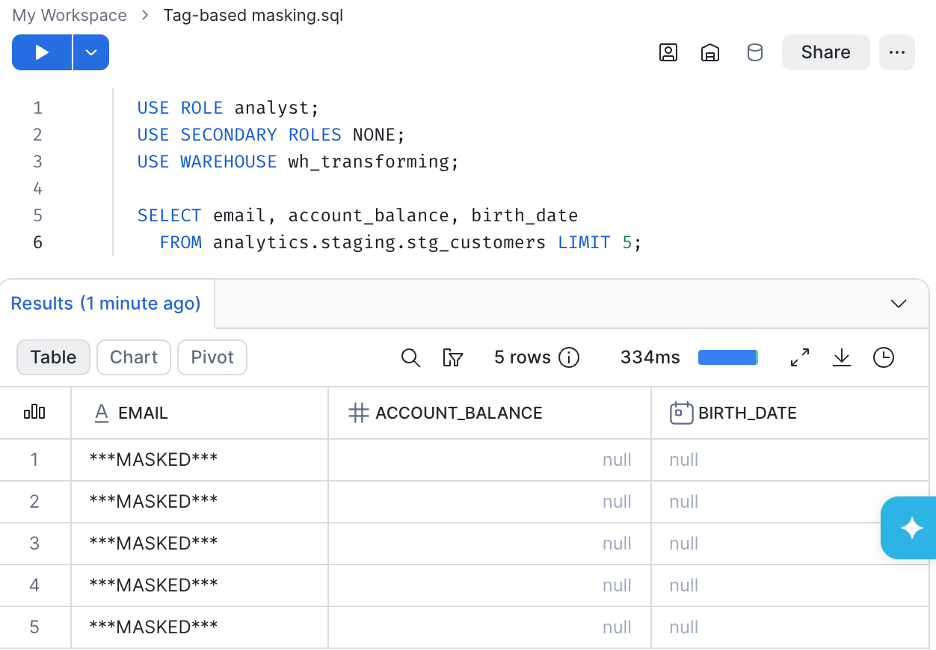
Then switch to analyst_pii, which does:
USE ROLE analyst_pii;
USE SECONDARY ROLES NONE;
USE WAREHOUSE wh_transforming;

SELECT email, account_balance, birth_date
  FROM analytics.staging.stg_customers LIMIT 5;
-- Every row returns real values, e.g.
-- 'john@example.com', 50000.00, '1985-03-15'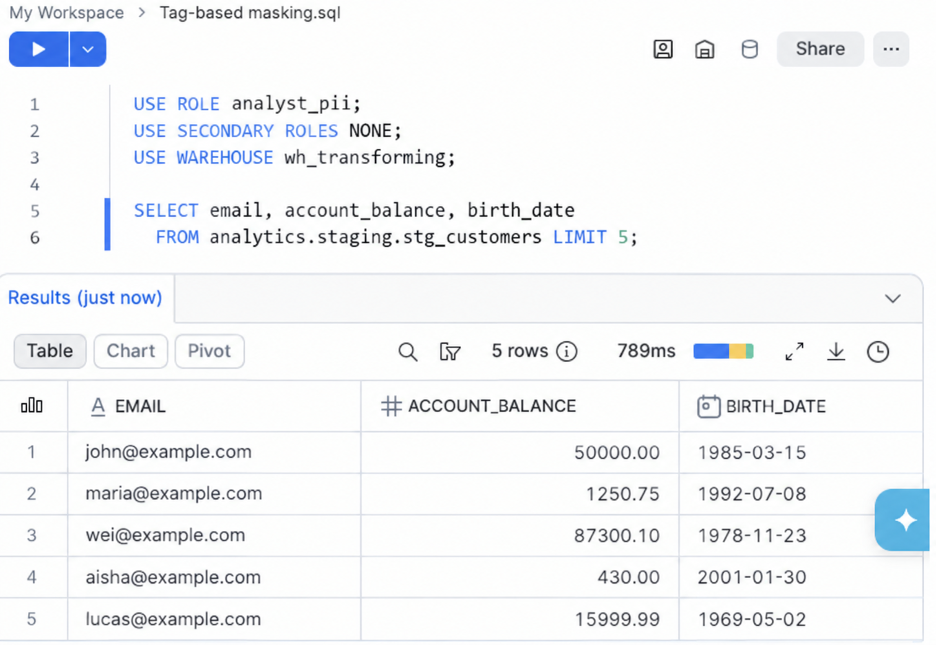
Same user, same table, same query. The only difference is the active role, and only the role holding z_unmask__pii gets real values back.
Notice USE SECONDARY ROLES NONE in both blocks. Your user holds analyst_pii, which contains analyst. Without that line, Snowflake could put analyst_pii in the session alongside analyst, and the “masked” query would return real data. The next section explains why.
Can Secondary Roles Bypass Snowflake Masking?
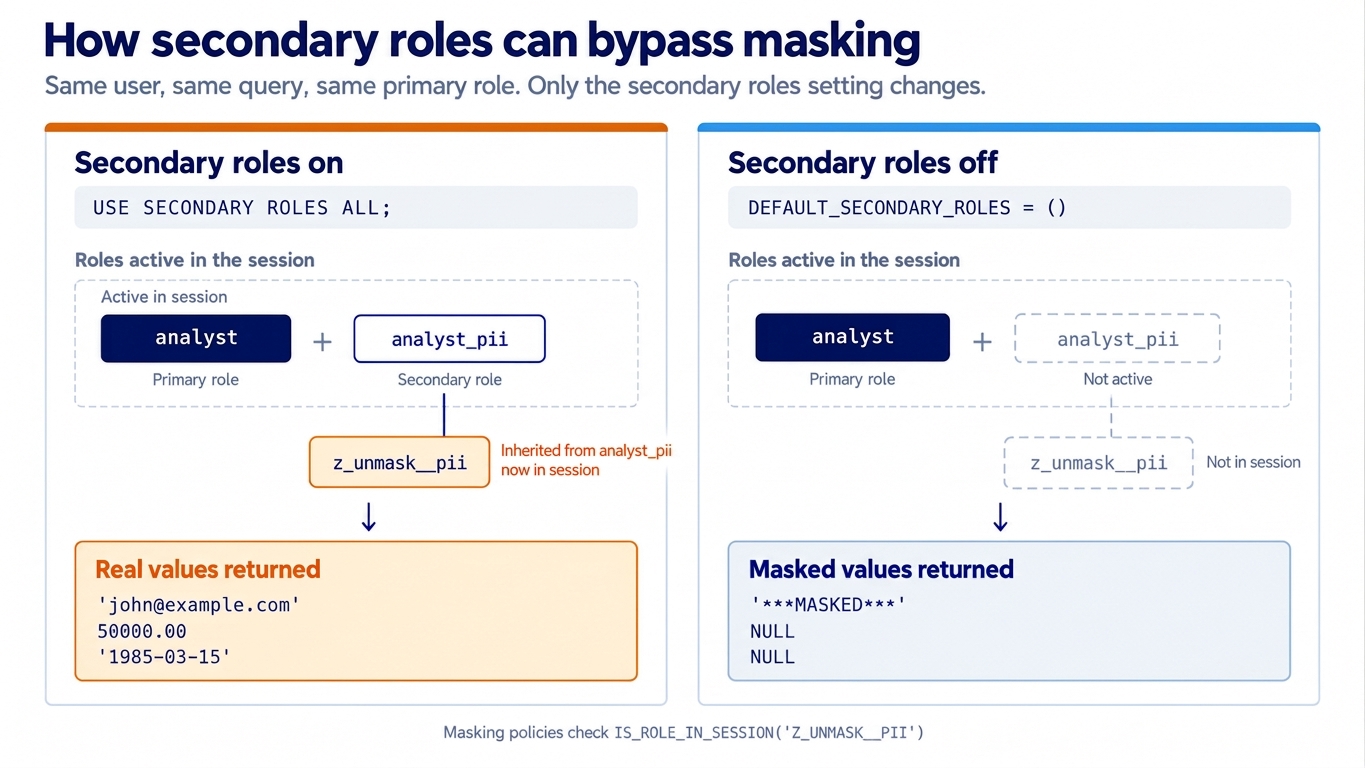
Yes. Every policy in this setup checks IS_ROLE_IN_SESSION('Z_UNMASK__PII'), which looks at the roles active in the session. When USE SECONDARY ROLES ALL is active, every role granted to the user is in the session, and that includes the unmask role.
This isn’t a rare configuration. Since Snowflake’s BCR-1692 behavior change, a user whose DEFAULT_SECONDARY_ROLES was never set gets ('ALL'). Unless you’ve set it explicitly, your users likely start every session with all their roles active.
Run the analyst query again, this time with secondary roles turned on:
USE ROLE analyst;
USE SECONDARY ROLES ALL;
USE WAREHOUSE wh_transforming;

SELECT email, account_balance, birth_date
  FROM analytics.staging.stg_customers LIMIT 5;
-- Every row returns real values, e.g.
-- 'john@example.com', 50000.00, '1985-03-15'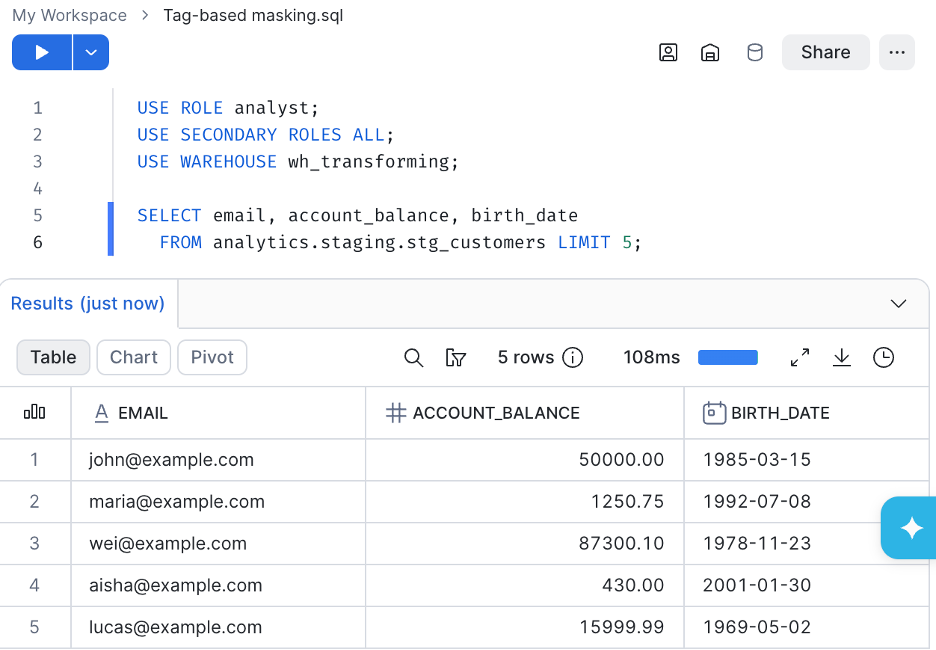
analyst is the primary role. analyst_pii is active as a secondary role, and it brings z_unmask__pii into the session. The policy finds the unmask role in the session and returns real values. You get no error and no warning.
Your user holds analyst_pii, so it’s allowed to see PII. What breaks is the role switch: you run USE ROLE analyst expecting masked output, and real values come back anyway.
The fix is to turn off default secondary roles for users who should see masked data:
-- Substitute your own Snowflake username
ALTER USER fmercado SET DEFAULT_SECONDARY_ROLES = ();
With that setting, secondary roles are no longer active when a session starts. A user can still turn them on with USE SECONDARY ROLES ALL. To block that too, set ALLOWED_SECONDARY_ROLES = () in a session policy on specific users. Leave it off the user that runs Snowcap. Snowcap reads your account through USE SECONDARY ROLES ALL; without it, the plan can’t read objects that other roles own, so it proposes recreating them and the apply fails.
Apply it to every user who holds a role with unmask access but sometimes switches to a role that should see masked data.
In Snowflake, secondary roles can bypass a masking policy that checks
IS_ROLE_IN_SESSION(). If a user holds an unmask role anywhere in their role grants,USE SECONDARY ROLES ALLputs it in the session, and queries return real values.
Tag-Based Masking Caveats and Limitations
Tag-based masking is the right default for most teams, but a few behaviors can surprise you. Two have already come up in this post: a data type with no matching policy stays unmasked, and secondary roles can bring the unmask role into the session. Here are the others to know before you rely on it.
A directly attached policy always wins. If a column has a masking policy attached directly and also inherits one through a tag, Snowflake uses the direct policy and ignores the tag-based one, without an error. Choose one mechanism per column so you always know which policy is in effect. The one deliberate use of this precedence is as an escape hatch: when a whole schema is masked by default, attach a pass-through policy directly to a reviewed non-sensitive column to exempt it.
Tags and policies are locked while they’re linked. You can’t drop a tag or a masking policy while the policy is assigned to the tag, and you can’t drop the schema or database that contains them either. Remove the tag-to-policy reference first, then drop the object.
Materialized views are blocked. You can’t create a materialized view on a table protected by a tag-based masking policy. Tagging a table that already has a materialized view is worse: the view is invalidated and can’t be queried until you remove the tag-based policy and recreate or resume the view. If your team relies on materialized views over tables that hold PII, account for this before you tag those tables.
It requires Enterprise Edition. Masking policies and tag-based masking need Snowflake Enterprise Edition or higher. On Standard Edition, none of this post applies.
What’s Next: Automate Tagging So Nothing Slips Through
Everything in this post works, but it has a gap. Masking only protects columns that carry the tag, and in this walkthrough someone had to add the tag by hand. That makes it fail-open. Forget a tag, mistype a column name, or let a new PII column arrive without one, and anyone who can query the table reads the real data. If this setup fails, it fails by leaking data.
Tagging columns one at a time is like locking doors one at a time: the door you forget stays open.
Tagging Snowflake columns one at a time is fail-open: until someone tags a sensitive column, anyone who can query the table reads the real data.
The governance objects you just built are the foundation for closing that gap. What changes is who applies the tag and when. The Snowcap masking guide recommends three approaches, and they stack:
- Tag at load time. Apply the tag right after dlt loads raw data, so PII is protected before dbt or any analyst can read it. The loader role gets
z_tag__apply__piibut not the unmask role, so it can move the data without seeing it. - Tag at creation time in dbt. Use model contracts and constraints so the tag is part of the
CREATE TABLEstatement. That way, no freshly built table sits unmasked, even for a moment. Post-hooks generated withsnowcap generate dbt-macrosare the fallback for view columns produced by a transformation. - Mask whole schemas by default. Set the tag on a sensitive schema so every new table and column is masked from the moment it exists. Then allowlist the columns you’ve reviewed and confirmed aren’t sensitive, using the direct-assignment escape hatch from the caveats above.
Masking controls what a column shows. For row-level security, see Snowcap’s Row Access Policies guide. Both build on the role hierarchy from the RBAC post.
Whichever route you take, hold this setup to a few rules. Add a policy before a column with a new data type gets tagged, because an unmasked column doesn’t announce itself. Keep default secondary roles off for masked users. And review every change to roles__unmasking.yml like a request for PII access, because that’s exactly what it is.
Snowcap is open source, and the full tag-based masking guide lives at snowcap.datacoves.com. If a resource type is missing or something behaves unexpectedly, GitHub issues are the right place. The Snowcap workshop also covers governance with Snowcap, including masking and row access policies, in video form.
Datacoves customers already run Snowcap against their Snowflake accounts. Datacoves can be deployed in your own private cloud, which makes it a fit for regulated industries like pharma, healthcare, finance, and government. Orrum Clinical Analytics, for example, built a HIPAA-aware dbt platform inside its private cloud. If you want governance like this applied across dbt and Airflow too, that’s what the Datacoves platform is built for. Book a free architecture review to talk through your setup.