- Snowcap is an open-source infrastructure-as-code tool for managing Snowflake.
- It's Snowflake-native and covers the full surface area (60+ resource types) in one place, instead of the usual mix of tools and manual steps.
- No state file: it reads Snowflake directly, so changes made outside the tool don't cause drift.
Managing Snowflake infrastructure is harder than it should be. The tools that exist either weren’t built for Snowflake specifically, cover only part of what you need to manage, or come with a permission model so opinionated it stops fitting your org somewhere around the second business unit. Most teams end up with a mix: one tool for grants, a script for provisioning, manual clicks for everything else. It works for a while, but doesn't scale well.
Snowcap is an open-source tool built to manage the whole thing in one place.
If you prefer a quick walkthrough, watch the video below.
Get our free ebook dbt Cloud vs dbt Core
Comparing dbt Core and dbt Cloud? Download our eBook for insights on feature, pricing and total cost. Find the best fit for your business!
Get the PDF
What Snowcap Is
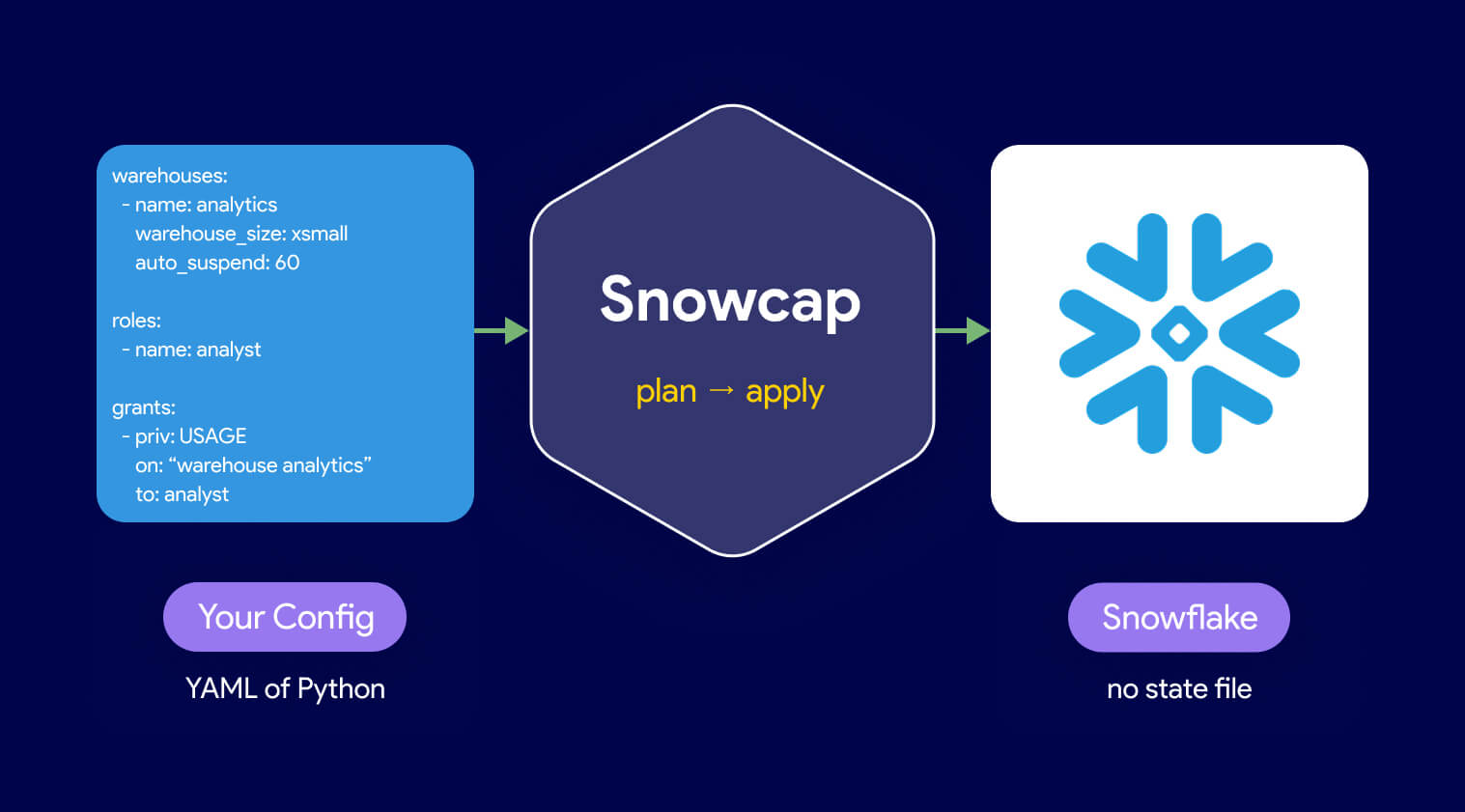
Snowcap is a Snowflake-native infrastructure as code tool, open source and maintained by Datacoves. You define your Snowflake resources in YAML or Python, run snowcap plan to see what would change, and run snowcap apply to make it happen. That’s the loop.
Pro-Tip: if you are using Snowcap against an existing Snowflake account DO NOT sync resources as that will override anything in your account with what is defined in your Snowcap configs. We also advise you always run
snowcap planand validate all snowflake changes before applying them.
There’s no state file. Instead of tracking your infrastructure in a local or remote file that drifts the moment someone makes a change outside the tool, Snowcap queries Snowflake directly on every run. It compares your config against what’s actually in the account and generates the SQL to make them match. If an admin creates a warehouse through the UI, Snowcap knows about it the next time you run. Nothing to reconcile.
What It Covers
Most IaC tools for Snowflake manage one slice of your account. Snowcap manages the full surface area: warehouses, databases, schemas, roles, users, grants, dynamic tables, hybrid tables, masking policies, row access policies, stages, pipes, streams, tasks, stored procedures, UDFs, integrations, and more. Over 60 resource types in total.
Configuration scales with your needs. For simple setups, a single YAML file is enough. For complex environments with dozens of business units or regional role variants, Snowcap supports templating: define a pattern once and apply it across a list. What used to mean copy-pasting a config block forty times becomes a single definition.
What’s Next
Snowcap is available now. The full documentation is at snowcap.datacoves.com. If you have an existing Snowflake account and want to see what your current setup would look like as config, snowcap export generates it for you, but this may need optimization if you have a Snowflake account with a lot of objects.
The next post in this series covers installation, authentication, and your first real config from scratch.
Prefer to watch? The Snowcap infrastructure-as-code workshop walks through the same setup end to end.
Snowcap is how we manage Datacoves deployments. To see how it fits into the full stack, visit datacoves.com/snowflake.