.png)
dbt Core and dbt Cloud both run the same transformation engine. The difference is in who manages the infrastructure around it.
dbt Core is open-source and free. It gives you full control over your environment but requires your team to build and maintain orchestration, CI/CD, developer environments, and secrets management.
dbt Cloud is a managed SaaS platform built on dbt Core. It simplifies setup with a built-in IDE, job scheduler, and CI/CD, but limits flexibility, restricts private cloud deployment, and can get expensive at scale.
Managed dbt Core platforms like Datacoves offer a third path: the operational simplicity of dbt Cloud with the flexibility and security of dbt Core, deployed in your own private cloud.
The right choice depends on your team's engineering capacity, security requirements, and how much infrastructure you want to own.
What Are dbt Core and dbt Cloud?
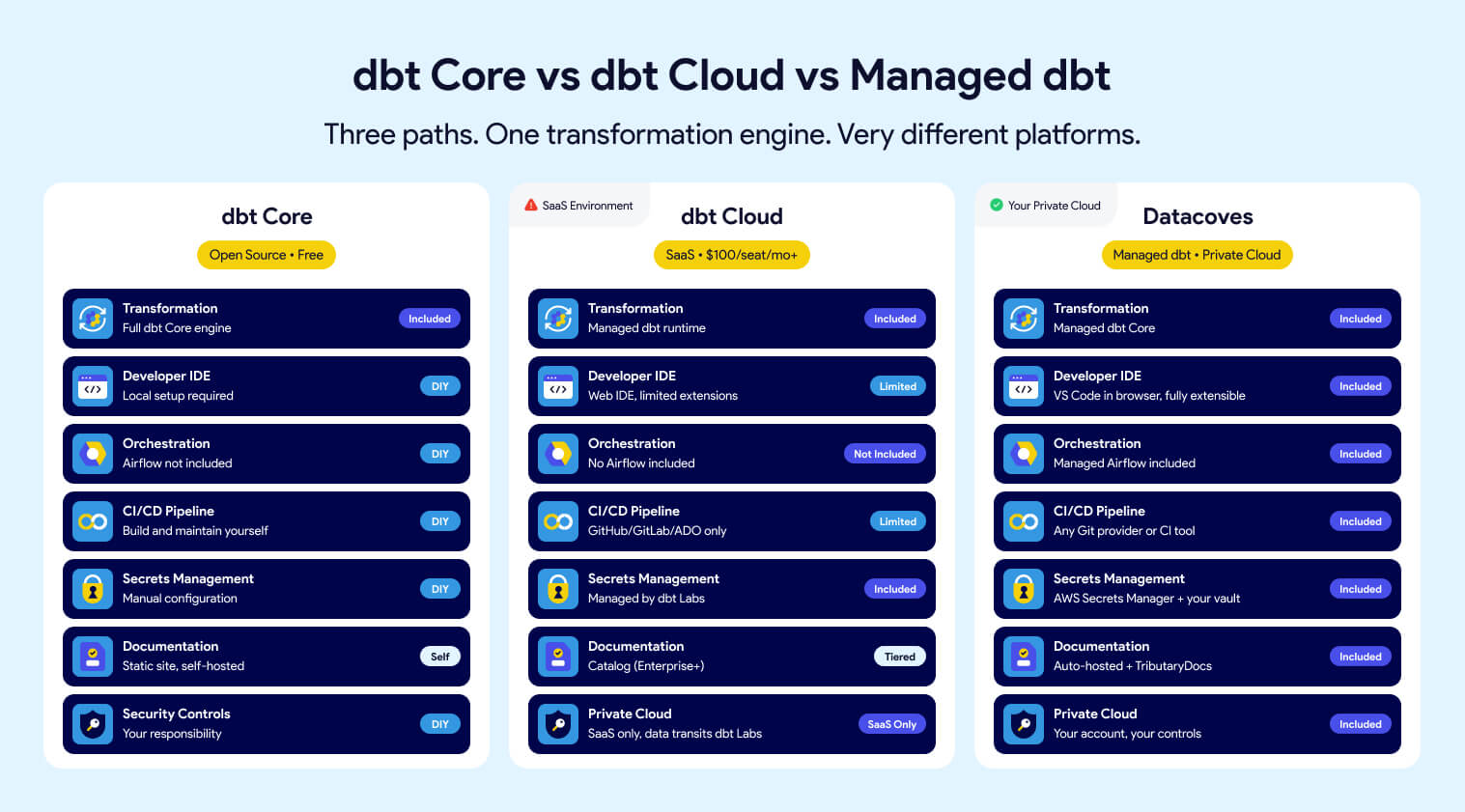
dbt Core and dbt Cloud both run the same transformation engine. The difference is in who manages the infrastructure around it.
dbt (data build tool) is an open-source transformation framework for building, testing, and deploying SQL-based data models. When people say "dbt," they're almost always talking about dbt Core, the engine that everything else is built on.
dbt Core is the open-source CLI tool maintained by dbt Labs. It's free, runs in any environment, and gives teams full control over their setup. Scheduling, CI/CD, and developer tooling are not included. Teams assemble those separately.
dbt Cloud is a managed SaaS platform built on dbt Core. It adds a web IDE, job scheduler, CI/CD integrations, a proprietary semantic layer, and metadata APIs. Setup is faster, but flexibility and private cloud deployment are limited.
Managed dbt platforms like Datacoves run dbt inside your own cloud with the surrounding infrastructure already in place: IDE, orchestration, CI/CD, secrets management, all managed for you.
All three run the same transformation engine. Everything else is a platform decision.
How dbt Core and dbt Cloud Compare at a Glance
The table below covers the key decision points. Sections that follow go deeper on each one.
Developer Environment: IDE and Setup
dbt Core
With dbt Core, every developer sets up their own environment. That means installing dbt, configuring a connection to the warehouse, managing Python versions, and handling dependencies like SQLFluff or dbt Power User. On paper, straightforward. In practice, setup can take anywhere from a few hours to several days depending on the developer's experience and the organization's IT constraints.
Pre-configured company laptops often ship with software that may conflict with dbt. Proxy settings, restricted package registries, and corporate firewall rules add friction before a developer writes a single line of SQL.
The upside is full control. Teams can use any IDE they prefer: VS Code, Cursor, PyCharm, or whatever fits their workflow. There are no constraints on tooling choices, and developers who already have strong local environment preferences can keep working the way they work best.
The maintenance challenge grows with team size. Every dbt version upgrade needs to happen in sync across all developers. On a small team that's manageable. On a team of 20 or more, someone is always on a different version, and those mismatches cause inconsistent behavior, failed CI runs, and debugging sessions that should never have happened. Organizations that skip upgrades to avoid the coordination cost accumulate technical debt that gets harder to unwind over time.
dbt Cloud
dbt Cloud's web IDE lets developers log in through a browser and start writing SQL without installing anything locally. No Python, no CLI, no profiles.yml. For analytics engineers who are new to dbt or unfamiliar with command-line tools, this is a genuine advantage.
The trade-off is flexibility. The web IDE does not support VS Code extensions or custom Python libraries. Teams that rely on SQLFluff configurations, internal Python packages, or warehouse-specific extensions like the Snowflake VS Code plugin will find it limiting.
dbt Cloud also offers a CLI option that lets developers work locally in VS Code while dbt Cloud handles compute. Many teams end up running both: newer analysts in the web IDE, senior engineers on the CLI. But the CLI path reintroduces the local environment problems the web IDE was supposed to solve. SQLFluff versions, Python dependencies, and VS Code extensions still need to be installed and kept in sync across every developer's machine. On larger teams, that version drift shows up quickly.
Managed dbt
Datacoves provides VS Code running in the browser, fully managed and pre-configured. Developers get the VS Code they already know, without any local installation. Warehouse connections, Git configuration, Python environments, and tooling like SQLFluff are set up out of the box.
Where Datacoves differs from dbt Cloud's web IDE: the environment is fully extensible. Teams can install any VS Code extension, add internal Python libraries, and configure the workspace to match their standards. Organizations with proprietary packages or warehouse-specific tooling can bring those into the environment without workarounds.
Onboarding a new developer is a matter of clicks, not days. When dbt or a dependent library needs an upgrade, Datacoves handles it. Developers work in a consistent, current environment without touching it.
Scheduling and Orchestration
dbt Core
dbt Core has no built-in scheduler. Teams choose their own orchestration tool, with Apache Airflow being the most common choice in enterprise environments. This gives full flexibility: you can connect ingestion, transformation, and downstream activation steps into a single pipeline, trigger internal tools behind the firewall, and orchestrate anything in your stack.
That flexibility comes with real cost. Airflow is not simple to operate. Running it reliably at scale requires Kubernetes knowledge, careful resource management, and dedicated engineering attention. A production-grade Airflow setup with separate local development, testing, and production environments is a multi-month investment for most teams. When you add advanced features like external secrets management, alerting, and DAG version control and the scope grows further.
Teams that underestimate this often end up with a fragile single-environment setup or become dependent on the key people who understand how everything works until it doesn't.
dbt Cloud
dbt Cloud includes a built-in job scheduler with a clean UI for configuring run frequency, retries, and alerts. For teams that only need to run dbt on a schedule, it works well and requires no additional tooling.
The limitation becomes clear when pipelines grow beyond dbt. If you need to connect an ingestion step before transformation, trigger a downstream tool after a model run, or orchestrate anything outside dbt's scope, the built-in scheduler is not enough. dbt Cloud offers an API to trigger jobs from an external orchestrator, but that adds integration overhead and means maintaining two systems.
Enterprise teams with existing Airflow infrastructure often end up running dbt Cloud jobs triggered by Airflow anyway, which raises the question of why they're paying for a scheduler they're not using.
Managed dbt
Datacoves includes managed Airflow as part of the platform. Two environments come pre-configured: a personal Airflow sandbox for each developer to test DAGs without affecting anyone else, and a shared Teams Airflow for production workflows. Both are pre-integrated with dbt and Airflow, so DAG creation for dbt runs is straightforward without custom operators or glue code.
Because Airflow runs inside your private cloud alongside dbt, it can reach internal systems, on-premise databases, and tools behind the corporate firewall. End-to-end pipelines that include ingestion, transformation, and activation steps all run in one orchestration layer without external API calls or cross-network dependencies.
Spinning up additional Airflow environments takes minutes, so enterprises can provision separate development, testing, and production environments without infrastructure work. Teams with complex testing requirements or multiple projects can have as many environments as they need.
Datacoves also supports simplified DAG creation using YAML, reducing the Python burden on teams that are primarily SQL-focused.
dbt Cloud covers transformation and scheduling, but it does not cover orchestration of the broader pipeline. Teams still need to run and maintain Airflow or another orchestrator alongside it.
CI/CD and DataOps
dbt Core
dbt Core gives teams complete control over their CI/CD pipeline. Any Git provider works: GitHub, GitLab, Bitbucket, Azure DevOps, or internal systems like Bitbucket Server. Any CI tool works too: GitHub Actions, GitLab CI, Jenkins, CircleCI, or whatever the organization already runs behind the firewall.
That flexibility is genuinely valuable for enterprises that have invested in internal tooling. A team on Jenkins with Bitbucket can build a world-class dbt CI pipeline without compromising on either tool.
The cost is setup time. Docker images need to be built and maintained with the right dbt version, SQLFluff configuration, and Python dependencies. CI runners need to be provisioned and kept current. Notification routing to Slack, MS Teams, or email needs to be configured separately. None of this is insurmountable, but it adds up fast and requires platform engineering skills that not every data team has.
Developers also have no way to run CI checks locally before pushing, which means failed CI runs often require multiple commits to fix, slowing down the feedback loop.
dbt Cloud
dbt Cloud has built-in CI that automatically triggers a run when a pull request is opened. It builds only the modified models and their downstream dependencies in a temporary schema, posts results back to the PR, and cleans up when the PR is merged or closed. For teams on GitHub or GitLab, this works well and requires minimal configuration.
The constraints appear quickly in enterprise contexts. Native automated CI only works with GitHub, GitLab, and Azure DevOps on Enterprise plans. Teams on Bitbucket, AWS CodeCommit, Jenkins, or any internal Git or CI system get no automated CI. They can use the dbt API to trigger jobs manually, but that requires custom integration work that undermines the simplicity dbt Cloud is supposed to provide.
Customization is also limited. The CI pipeline runs dbt checks. Adding custom steps, internal validation scripts, or governance checks outside of what dbt Cloud natively supports requires workarounds. Teams with mature DataOps practices often find the built-in CI too rigid to fit their standards.
Managed dbt
Datacoves provides pre-built CI/CD pipelines that work with any Git provider and any CI tool, including Jenkins and internal enterprise systems behind the firewall. The pipeline comes configured with dbt testing, SQLFluff linting, dbt-checkpoint governance checks, and deployment steps out of the box.
Developers can run the same CI checks locally before pushing changes, which catches issues before they reach the pipeline and dramatically reduces the back-and-forth of fixing failed CI runs. When the local check passes, the CI check passes.
Because the pipeline is fully customizable, teams can add any step they need: internal approval workflows, custom validation scripts, notifications to MS Teams, or integration with ticketing systems like Jira. There are no constraints on providers or tools.
Semantic Layer
dbt Core
dbt Core has no built-in semantic layer. Teams choose from several mature options depending on their warehouse and BI tool preferences.
Cube.dev is the most widely adopted open-source choice. It provides a headless semantic layer with its own API, caching, and broad BI tool support. Lightdash and Omni are strong alternatives that integrate tightly with dbt models and work well for teams that want metric definitions to live close to their transformation code.
For Snowflake users, the dbt_semantic_view package lets teams manage Snowflake Semantic Views directly from their dbt project. Metrics defined this way live in the warehouse itself and are accessible to any tool connected to Snowflake, without routing data through a third-party service.
The open-source path requires more setup and maintenance than a managed semantic layer, but it gives teams full control over where metrics are defined, how they are served, and which tools consume them.
dbt Cloud
dbt Cloud includes a hosted semantic layer powered by MetricFlow. MetricFlow was acquired from Transform in 2023 and open-sourced under Apache 2.0 at Coalesce 2025. The engine itself is now free to use. The hosted service in dbt Cloud is a paid feature available on Starter plans and above. Usage is metered by queried metrics per month and caching, which reduces repeated warehouse hits, is an Enterprise-only feature.
Supported BI integrations include Tableau, Power BI, Google Sheets, and Excel, among others. Most are generally available. The exception is Power BI, which is still in public preview and requires additional setup through an On-premises Data Gateway for Power BI Service.
Warehouse support is incomplete. Microsoft Fabric is not supported. When queries run through the dbt Cloud semantic layer, data passes through dbt Labs servers on the way back from the warehouse. For organizations in regulated industries with strict data residency requirements, that is a hard blocker.
The spec itself is also in flux. dbt Labs recently modernized the MetricFlow YAML spec with the Fusion engine, and the new spec is coming to dbt Core in version 1.12. dbt Labs has also joined the Open Semantic Interchange initiative alongside Snowflake, Salesforce, BlackRock, and others to work toward an open standard, though no engine is fully OSI compliant yet. Teams investing heavily in the dbt Cloud semantic layer today should be aware that the spec is still evolving.
Managed dbt
Datacoves does not lock teams into a single semantic layer approach. Depending on your warehouse and BI stack, you can use Snowflake Semantic Views via a dbt package, Cube.dev, Lightdash, or Omni. All options run inside your private environment, with no query data passing through third-party servers.
Because Datacoves runs dbt Core, teams can adopt MetricFlow natively when dbt Core 1.12 ships the new spec. No migration friction, no proprietary hosting layer to work around, and no metered query limits to plan around.
The OSI standard is still developing. Until compliance is widespread across tools, flexibility is the lower-risk position. Datacoves gives you that flexibility without requiring a bet on any single vendor's implementation.
Documentation and Lineage
dbt Core
dbt Core generates documentation automatically from your project: model descriptions, column definitions, tests, and a DAG showing upstream and downstream dependencies. You run dbt docs generate to build the static site and dbt docs serve to view it locally.
The limitation is hosting. dbt Core produces a static artifact. Your team is responsible for serving it somewhere accessible, keeping it updated after each run, and managing access controls. Many teams end up with stale docs because the pipeline to publish and refresh them is never properly automated. As projects grow across multiple teams and hundreds of models, the static site format also becomes a constraint. Navigation slows down, search is limited, and there is no real multi-project support.
dbt Cloud
dbt Cloud hosts your documentation automatically and updates it after each production run. On Starter plans, teams get dbt Catalog rather than the static dbt Docs experience. The features that matter most at enterprise scale, including column-level lineage, multi-project lineage, and project recommendations, are gated behind the Enterprise plan.
It is also worth noting that Snowflake now provides native lineage including column-level lineage directly in the platform, which covers a significant portion of what teams historically needed a separate docs tool to provide.
Managed dbt
Datacoves automates documentation generation and hosting as part of the CI/CD pipeline. Docs are updated on every merge without manual intervention, and the hosted site is available to your full team inside your private environment at no additional cost.
For teams that have outgrown the static dbt docs experience, Datacoves also offers TributaryDocs. Unlike the default dbt docs site, TributaryDocs is a client-server application, which means it scales to enterprise-sized projects without the performance and navigation limitations of a static site. It includes an MCP server, enabling AI tools to query your documentation directly and making your data catalog part of your AI-assisted development workflow.
Datacoves customers can also connect external catalogs like Alation or Atlan, or use the catalog built into their warehouse. Snowflake, for example, includes native column-level lineage directly in the platform.
APIs and Extensibility
dbt Core
dbt Core produces a set of artifacts after every run: manifest.json, catalog.json, and run_results.json. These files contain your full project metadata and are the foundation for any custom tooling, observability integrations, or downstream automation you want to build.
Because dbt Core is open source, you have complete access to these artifacts and full control over how you use them. The tradeoff is that everything is self-managed. Parsing artifacts, building pipelines around them, and integrating with other systems requires custom engineering work that your team owns and maintains.
dbt Cloud
dbt Cloud exposes a set of APIs including the Discovery API for metadata queries, the Administrative API for managing jobs and environments, and webhooks for event-driven automation. These are well-documented and cover most standard integration scenarios.
The limitations show up at the edges. CI/CD integrations are constrained to supported Git providers. Some API capabilities are plan-gated, with full access requiring Enterprise. Teams building complex internal tooling or integrating with systems outside dbt's supported ecosystem may find the platform less flexible than working directly with dbt Core artifacts.
Managed dbt
Datacoves runs dbt Core, so all native artifacts are available with no restrictions. Teams can build against manifest.json and run_results.json directly, integrate with any internal system, and use any CI tool or Git provider without platform constraints.
Datacoves also provides a dbt API that enables pushing and pulling artifacts programmatically. This is particularly useful for slim CI, where only changed models are tested, and for deferral, where development runs reference production state without rebuilding the entire project.
On the orchestration side, Datacoves exposes the Airflow API, giving teams full programmatic control over their pipelines. This enables event-driven architectures using Airflow datasets, where DAGs trigger based on data availability rather than fixed schedules. Datacoves also uses run_results.json within Airflow to enable retries from the point of failure, so when a model fails mid-run, the DAG resumes from that model rather than restarting the entire pipeline.
For teams that want API-driven metadata beyond what dbt Core artifacts provide, TributaryDocs exposes an MCP server that makes your documentation and lineage queryable by AI tools and external systems.
AI and LLM Integration
dbt Core
dbt Core has no built-in AI capabilities. Teams can integrate any AI tool they choose by connecting it to their local development environment. VS Code extensions like GitHub Copilot, Cursor, or any MCP-compatible client can work alongside dbt Core projects with full access to your codebase.
The flexibility is real, but so is the setup overhead. Each developer configures their own AI tooling independently, which means inconsistent experiences across the team and no centralized control over which models or providers are in use.
dbt Cloud
dbt Cloud includes dbt Copilot, an AI assistant built into the Cloud IDE. Copilot can generate documentation, tests, semantic models, and SQL based on the context of your dbt project. It is generally available on Enterprise plans and available in limited form on Starter.
The constraint is that Copilot is tied to OpenAI. Teams cannot bring their own LLM or route requests through their own Azure OpenAI instance unless they are on Enterprise and configure bring-your-own-key. Usage is also metered: 100 actions per month on Developer, 5,000 on Starter, and 10,000 on Enterprise. dbt Cloud also provides its own MCP server for integrating dbt context into AI workflows, but does not support connecting arbitrary third-party MCP servers within the platform. For organizations with strict data governance policies around which AI providers can touch their code and metadata, the lack of model choice is a hard limitation.
Managed dbt
Datacoves supports any LLM your organization has approved. Teams can connect Anthropic, OpenAI, Azure OpenAI, GitHub Copilot, or Snowflake Cortex CLI directly to the VS Code environment without platform restrictions. Snowflake Cortex CLI also supports skills, enabling teams to build custom AI-powered workflows grounded in their warehouse data. There are no metered AI actions and no dependency on a single provider.
Because Datacoves provides VS Code in the browser, teams can configure any MCP server alongside their dbt project, not just a single platform-provided one. This means connecting Snowflake's MCP server, TributaryDocs' MCP server, or any other MCP-compatible tool is a configuration choice, not a platform constraint.
For organizations in regulated industries where AI provider choice is a compliance requirement, the bring-your-own-LLM architecture is not a nice-to-have. It is a prerequisite.
Security and Compliance
dbt Core
dbt Core has no built-in security controls. All security decisions sit with your team: where the environment runs, how credentials are managed, who has access, and how secrets are stored. For teams with the engineering capacity to implement this properly, that is complete flexibility. For everyone else, it is undifferentiated heavy lifting.
The most common gaps are secrets management, environment isolation, and consistent access controls across developers. These are solvable problems, but solving them requires deliberate investment and ongoing maintenance.
dbt Cloud
dbt Cloud is a SaaS product. Your data stays in your warehouse, but your code, metadata, and credentials pass through dbt Labs infrastructure. For many teams that is an acceptable tradeoff. For organizations in regulated industries such as pharma, healthcare, finance, and government, it often is not.
dbt Cloud offers SSO, role-based access control, and SOC 2 Type II compliance. PrivateLink and IP restrictions are available, but only on Enterprise+ plans. Teams that need their entire development and orchestration environment to remain inside their own network perimeter will find that dbt Cloud cannot meet that requirement regardless of plan.
Managed dbt
Datacoves can be deployed in your private cloud account. Your code, your credentials, your metadata, and your pipeline execution all stay inside your own network. There is no VPC peering required and no data transiting a third-party SaaS environment.
Datacoves integrates with your existing identity provider via SSO and SAML, connects to your secrets management system such as AWS Secrets Manager, and supports your organization's logging and audit requirements. Security controls are not bolt-ons, they are part of the deployment architecture from day one.
For organizations in regulated industries, this is the architecture that passes security reviews without exceptions. You are not asking your security team to approve a SaaS vendor touching your pipeline. You are showing them that everything runs in your own account, under your own controls.
Total Cost of Ownership

dbt Core
dbt Core is free. The cost is everything around it. A team that builds its own platform on dbt Core needs to provision and maintain developer environments, stand up and operate Airflow, build CI/CD pipelines, manage secrets, handle upgrades, and onboard every new developer into a custom setup.
That work falls on your most senior engineers. It is not a one-time cost. Every version upgrade, every new team member, and every incident that traces back to environment inconsistency is time your team is not spending on data products. Open source looks free the way a free puppy looks free.
dbt Cloud
dbt Cloud starts at $100 per developer seat per month on the Starter plan, capped at five developers. Full enterprise capabilities require an Enterprise contract with custom pricing. Semantic Layer usage is metered separately. Copilot usage is metered separately. Teams that grow beyond five developers or need features like multi-project lineage, column-level lineage, or advanced CI/CD will find that the total bill looks very different from the entry price.
There is also an indirect cost. dbt Cloud covers transformation and scheduling, but it does not cover orchestration of the broader pipeline. Teams still need to run and maintain Airflow or another orchestrator alongside it, which means the dbt Cloud platform cost is only part of the picture.
Managed dbt
Datacoves provides the full environment: VS Code, dbt Core, Airflow, CI/CD, secrets management, documentation hosting, and governance guardrails. There is no separate orchestration bill, no environment infrastructure to maintain, and no platform engineering team required to keep it running.
Onboarding a new developer takes minutes, not days. Datacoves customers report reducing onboarding time by approximately 30 hours per developer. At scale, across a team of 20 or 30 engineers, that compounds quickly.
The right comparison is not Datacoves versus dbt Cloud's license fee. It is Datacoves versus the total cost of dbt Cloud plus Airflow infrastructure plus the engineering time to build and maintain the environment around them.
The Third Option: Managed dbt Core
Most comparisons of dbt Core and dbt Cloud treat the choice as binary. It is not.
dbt Core gives you full control and zero cost, but leaves your team responsible for building and maintaining everything around it. dbt Cloud removes that burden but constrains your tooling, your security posture, and your budget as you scale. Both options make tradeoffs that many enterprise teams cannot accept.
The third option is a managed dbt platform that runs in your own cloud, on your own terms.
A managed dbt platform provides the operational simplicity of dbt Cloud with the flexibility and security of dbt Core, deployed in your own private cloud.
Datacoves delivers the operational simplicity of dbt Cloud without the SaaS architecture, the vendor lock-in, or the platform constraints. Your team gets a fully configured environment from day one: VS Code in the browser, dbt Core, managed Airflow, CI/CD pipelines, secrets management, and governance guardrails, all running inside your private cloud account.
You keep full ownership of your code and your data. You choose your warehouse, your Git provider, your CI tool, your LLM, and your BI stack. When your requirements change, the platform adapts. There is no migration to a new vendor and no renegotiation of what the platform will and will not support.
For enterprise teams in regulated industries, for organizations that have outgrown dbt Cloud's constraints, and for data leaders who want the best-practice foundation of a managed platform without surrendering control, Datacoves is the path that does not require a compromise.
Datacoves doesn't replace your tools. It gives them a proper home.
How to Choose: dbt Core vs dbt Cloud vs Managed dbt
The right choice depends on your team's size, security requirements, and how much of the platform you want to own.
Choose dbt Core if:
- You have a small, highly technical team that is comfortable building and maintaining infrastructure
- You want complete control over every component of your stack
- You have existing Airflow infrastructure and the engineering capacity to integrate it properly
- Budget is the primary constraint and you can absorb the hidden costs of DIY
Choose dbt Cloud if:
- Your security and compliance requirements allow for SaaS-based code and metadata hosting
- You want a fully managed transformation environment without standing up your own infrastructure
- Your orchestration needs are met by dbt's built-in scheduler and you do not need Airflow
- You are comfortable with OpenAI-based AI tooling or can configure bring-your-own-key on Enterprise
- You are just getting started with dbt and that is your only priority right now
Choose Datacoves if:
- You are in a regulated industry where data and code must stay inside your own cloud
- You have outgrown dbt Cloud's constraints around Git providers, CI tooling, or orchestration
- You need managed Airflow alongside dbt without building and maintaining the integration yourself
- You want AI flexibility, including bring-your-own-LLM, without metered usage caps
- You are modernizing from legacy ETL and need a proven architecture with best practices built in
- You want the operational simplicity of a managed platform without surrendering control of your environment
If you are evaluating dbt Core and dbt Cloud and neither feels quite right, that is usually a signal. Most enterprise teams do not lack good tools. They lack a proper platform to run them in.

Ready to see how Datacoves works in your environment?
Book a demo to walk through the platform with a Datacoves expert.
FAQ
Can dbt Core replace dbt Cloud?
dbt Core provides the same transformation engine that powers dbt Cloud. What it does not include is managed hosting, a scheduler, an IDE, or an observability layer. Teams that run dbt Core successfully at scale typically pair it with Airflow, a managed developer environment, and a CI/CD pipeline. A managed platform like Datacoves provides all of this preconfigured, inside your own cloud.
Does dbt Cloud support Airflow?
No. dbt Cloud includes its own built-in scheduler for dbt jobs but does not provide or manage Airflow. Teams that need Airflow for end-to-end pipeline orchestration, including ingestion, transformation, and activation steps, must run and maintain it separately alongside dbt Cloud. This is one of the most common gaps enterprise teams hit as their pipelines grow.
How do I choose between dbt Cloud, dbt Core, and a managed platform?
Start with two questions: Does your data need to stay inside a private cloud? And does your team have the capacity to build and maintain platform infrastructure? If the answer to either is yes and no respectively, a managed dbt Core platform is the right call. dbt Cloud is a strong fit for smaller, SQL-first teams that want fast setup and minimal DevOps. DIY dbt Core makes sense only when you have strong platform engineering resources and specific customization requirements that no managed option can meet.
How long does it take to set up dbt Core from scratch?
Longer than most teams expect. Setting up a production-ready dbt Core environment, including developer environments, CI/CD pipelines, managed Airflow, secrets management, and upgrade processes, commonly takes six months to a year for enterprise teams. A managed platform compresses that timeline to days or weeks and eliminates the ongoing maintenance burden.
Is Datacoves a dbt Cloud alternative?
Yes. Datacoves is an enterprise-grade alternative to dbt Cloud that runs in your own cloud environment. It provides managed dbt Core, managed Airflow, VS Code in the browser, CI/CD pipelines, and governance guardrails, with no SaaS data residency requirements and no lock-in to a single vendor's tooling choices.
Is dbt Core free?
Yes. dbt Core is open source and free to use under the Apache 2.0 license. The real cost is the infrastructure and engineering time required to build and maintain everything around it: developer environments, orchestration, CI/CD, secrets management, and upgrades. Open source looks free the way a free puppy looks free.
What is a managed dbt platform?
A managed dbt platform provides a fully configured environment for running dbt Core in production, including developer tooling, orchestration, CI/CD, secrets management, and governance, without requiring your team to build and maintain the infrastructure from scratch. Datacoves is a managed dbt platform that runs inside your private cloud account, not a vendor's.
When does dbt Cloud become expensive?
dbt Cloud's Team plan starts at $100 per developer per month, capped at five developers. Beyond that, teams move to Enterprise pricing. Semantic Layer usage and Copilot are metered separately. Teams with larger engineering organizations or heavy AI-assisted workflows often find the total cost significantly higher than the entry price suggests.
When is dbt Cloud worth the cost?
dbt Cloud makes sense when you want to move fast, reduce infrastructure overhead, and keep analytics engineers focused on modeling rather than DevOps. It's particularly valuable for SQL-first teams without deep platform engineering capabilities, organizations that need fast onboarding, and companies where built-in SOC 2 and audit logging simplify compliance. The Developer tier is free for solo users, making it a low-risk starting point.
When should you choose dbt Core over dbt Cloud?
Choose dbt Core if your team has engineering resources to manage infrastructure, you're already running Airflow or another orchestrator, you have strict data residency or security requirements that prevent SaaS usage, or you need flexibility to integrate internal tools behind a corporate firewall. dbt Core is also the right call when your enterprise requires private cloud deployment, something dbt Cloud can't deliver.
Which option is best for regulated industries?
For organizations in pharma, healthcare, finance, or government where data and code must remain inside a private network, dbt Cloud's SaaS architecture is typically not viable. dbt Core with a managed platform like Datacoves provides the same operational simplicity while keeping everything inside your own network perimeter. No VPC peering. No data leaving your environment.

-Photoroom.jpg)


.png)