dbt transforms data inside your warehouse using SQL. Airflow orchestrates workflows across your entire data pipeline. They are not competing tools -- they solve different problems. dbt handles the "T" in ELT: modeling, data testing, unit testing, documentation, and lineage. Airflow handles the scheduling, sequencing, retries, failure notifications, observability, and coordination of every step in the pipeline, including ingesting data, triggering dbt, and activation steps. Most production data teams use both. The real decision is not which tool to pick, but how to run them together without drowning in infrastructure overhead.
What is Apache Airflow?
Airflow is a workflow scheduler, but it is only one part of a broader data orchestration problem that includes dependencies, retries, visibility, and ownership across the entire data lifecycle.
How Does Airflow Work?
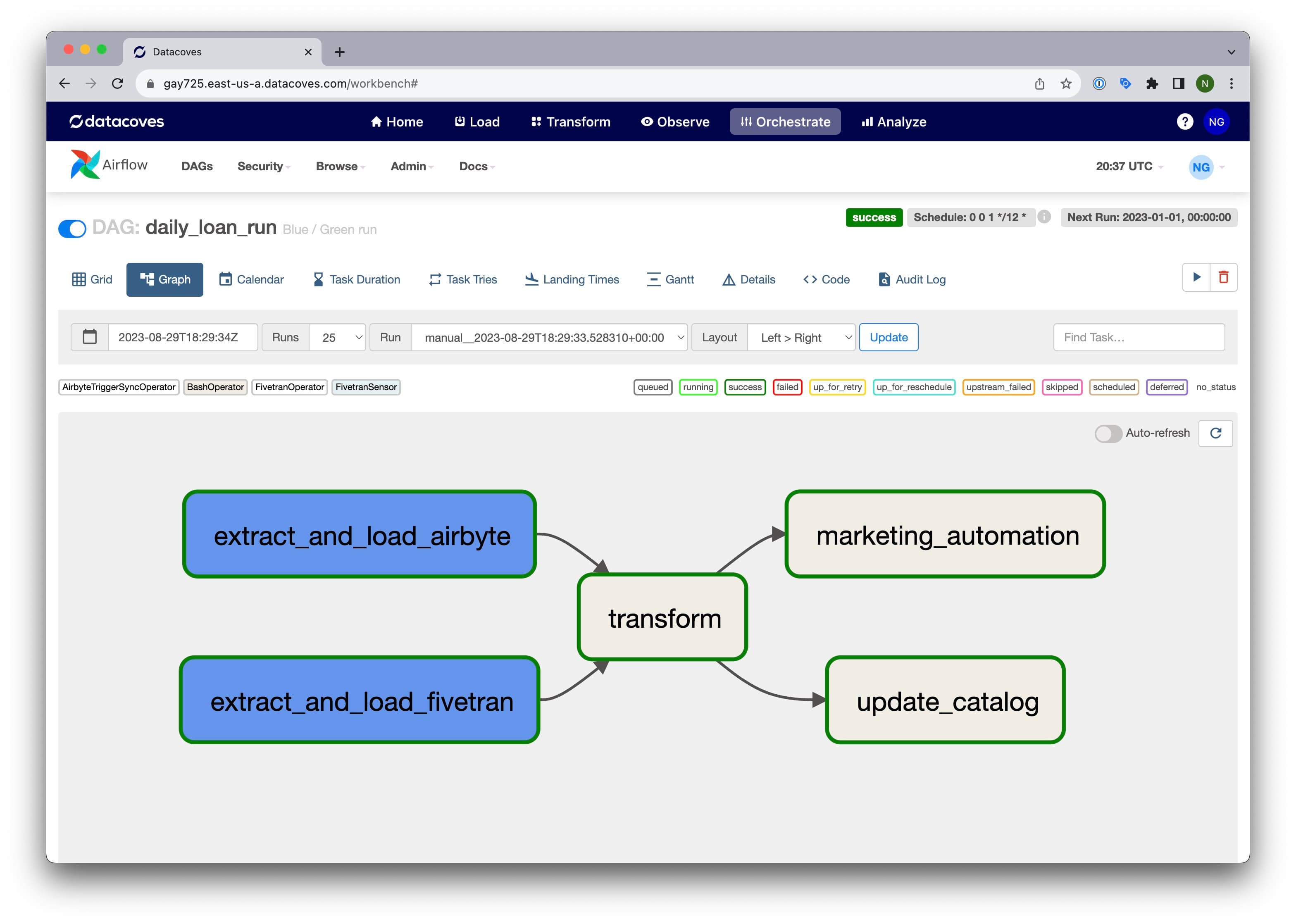
Imagine a scenario where you have a series of tasks: Task A, Task B, and Task C. These tasks need to be executed in sequence every day at a specific time. Airflow enables you to programmatically define the sequence of steps as well as what each step does. With Airflow you can also monitor the execution of each step and get alerts when something fails.

What Sets Airflow Apart?
Airflow's core strength is flexibility. You define the code behind each task, not just the sequence and schedule. Whether it's triggering an extraction job, calling a Python script, or integrating with an external platform, Airflow lets you control exactly how each step executes.
But that flexibility is a double-edged sword. Just because you can code everything inside Airflow doesn't mean you should. Overly complex task logic inside Airflow makes workflows harder to debug and maintain. The best practice: use Airflow as the orchestrator, not the execution engine. Let specialized tools handle the heavy lifting. Use tools like dbt for transformation and tools like Azure Data Factory, dlt, Fivetran or Airbyte for extraction. Let Airflow handle the scheduling, coordination, observability, and failure notification.
Best Use Cases for Airflow
- Data Extraction and Loading: Trigger external tools like Azure Data Factory, dlt, Fivetran, or Airbyte for data ingestion. When no off-the-shelf tool exists, Airflow can call custom Python scripts or frameworks like dlt to handle the load.
- Data Transformation Coordination: Trigger dbt Core to run transformation steps in the right sequence with appropriate parallelism, directly in the data warehouse.
ML Workflow Coordination: Orchestrate machine learning pipelines, from data preprocessing to model refreshes, ensuring each step runs after upstream transformations complete.
Automated Reporting: Trigger report generation or data exports to BI and reporting tools on a schedule.
System Maintenance and Monitoring: Schedule backups, manage log storage, and send alerts on system anomalies.
Airflow Benefits
- Job Management: Define workflows and task dependencies with a built-in scheduler that handles sequencing and synchronization.
- Retry Mechanism: Automatically retry failed tasks or entire pipelines with configurable retry logic, ensuring resilience and fault tolerance.
- Alerting: Send failure notifications to email, Slack, MS Teams, or other tools so your team knows immediately when something breaks.
- Monitoring: Track workflow status, task durations, and historical runs through the Airflow UI.
- Scalability: Deploy on Kubernetes to scale up during peak processing and scale down when idle, keeping infrastructure costs aligned with actual usage.
- Community: Active open-source project with robust support on GitHub and Slack, plus a deep library of learning resources.
Airflow Challenges
- Python Required: Airflow is Python-based, so creating workflows requires Python proficiency.
- Learning Curve: Concepts like DAGs, operators, hooks, and task dependencies take time to master, especially for team members without prior orchestration experience.
- Production Deployment: Setting up a production-grade Airflow environment requires knowledge of Kubernetes, networking, and infrastructure tuning.
- Ongoing Maintenance: Upgrading Airflow and its underlying infrastructure carries real cost and complexity, particularly for teams that don't manage distributed systems regularly.
- Debugging: Identifying root causes in a complex Airflow environment requires experience. Knowing where to start is half the battle.
- Cost of Ownership: Airflow is open-source and free to use, but the total cost of deployment, tuning, and ongoing support adds up quickly.
- Development Experience: Testing DAGs locally requires setting up Docker-based Airflow environments, which adds friction and slows iteration cycles.
What is dbt?
dbt (data build tool) is an open-source framework that uses SQL and Jinja templating to transform data inside the warehouse. Developed by dbt Labs, dbt handles the "T" in ELT: transforming, testing, documenting, and tracking lineage of data models. It brings software engineering practices like version control, CI/CD, and modular code to analytics workflows.
How Does dbt Work?
dbt lets you write transformation logic as SQL select statements, enhanced with Jinja templating for dynamic execution. Each transformation is called a "model." When you run dbt, it compiles those models into raw SQL and executes them against your warehouse, creating or replacing tables and views. dbt resolves dependencies between models automatically, running them sequentially or in parallel as needed.
What Sets dbt Apart?
Unlike traditional ETL tools that abstract SQL behind drag-and-drop interfaces, dbt treats SQL as the primary language for transformation. This makes it immediately accessible to anyone who already knows SQL. But dbt goes further by adding Jinja templating for dynamic scripting, conditional logic, and reusable macros.
A few things set dbt apart from alternatives:
- Idempotency: dbt transformations produce the same result every time they run, making pipelines predictable and repeatable.
- Testing built in: Define data quality tests alongside your models. No need for a separate testing tool.
- Auto-generated documentation: dbt produces a web-based docs site with descriptions, lineage graphs, and metadata -- all generated directly from your project.
- Open metadata: dbt outputs metadata files (artifacts) that downstream tools like data catalogs and observability platforms can consume. This format is quickly becoming the standard for sharing information across data platforms.
dbt excels at the "T" in ELT but requires complementary tools for extraction, loading, and orchestration.
Best Use Cases for dbt
- Data Transformation for Analytics: Transform and aggregate raw data into models ready for BI platforms, analytics tools, and ML pipelines.
- SQL-based Workflow Creation: Build modular transformation workflows using SQL and Jinja, with reusable macros and dynamic script generation.
- Data Validation and Testing: Define schema tests and custom tests alongside your models to catch data quality issues before they reach end users.
- SQL Unit Testing: Verify that a specific transformation works as expected by providing sample input data and comparing against expected output.
- Documentation and Lineage: Auto-generate a documentation site with descriptions, column-level lineage, and dependency graphs to simplify impact analysis and debugging.
- Version Control and DataOps: Manage transformations through Git-based workflows with branching, pull requests, and environment-specific deployments.
dbt Benefits
- SQL-based: dbt uses SQL and Jinja for transformation, so most data analysts and engineers can contribute without learning a new language.
- Modularity: Each transformation is a SQL select statement that builds on other models. This modular approach simplifies debugging, testing, and reuse.
- Testing: Built-in testing framework lets you validate data quality at every layer without introducing additional tools.
- Documentation: Auto-generated docs site exposes descriptions, lineage, and metadata, making it easier to maintain projects over time and helping data consumers find and understand data before use.
- Lineage and Impact Analysis: Visual dependency graphs simplify debugging when issues occur and help you trace which sources feed a specific data product like an executive dashboard.
- Open-source: dbt Core is open-source with no vendor lock-in.
- Packages and Libraries: A large community maintains reusable dbt packages and Python libraries that extend dbt's functionality out of the box.
- Open Metadata: dbt produces artifact files that data catalogs and observability tools can consume, making it a de facto standard for sharing metadata across platforms.
- AI-Ready Foundation: dbt's structured metadata, lineage, and documentation make your warehouse AI-ready. When dbt artifacts are available in your warehouse (e.g. Snowflake), AI tools can use that context to understand table relationships, column descriptions, and data quality rules, turning your transformation layer into a knowledge layer that LLMs and copilots can reason over. See Snowflake Cortex CLI running in Datacoves.
- Community: 100k+ members on Slack, extensive learning resources, and a growing ecosystem of practitioners solving similar data problems.

dbt Challenges
- Transformation only: dbt handles the "T" in ELT. Extraction, loading, orchestration, and downstream activation all require separate tools.
- Macros complexity: dbt macros are powerful but can be hard to read, debug, and test, especially for analysts who are primarily SQL users.
- Infrastructure management: Running dbt Core in production requires setting up CI/CD, environment management, secrets handling, and Git workflows. This overhead grows as the team and project scale.
- No built-in orchestration: dbt Core has no scheduler. You need an external orchestrator like Airflow to automate runs and coordinate dbt with the rest of your pipeline.
- Multi-project complexity: As organizations grow into multiple dbt projects, managing cross-project dependencies, shared models, and consistent conventions becomes a significant challenge.
Common Misconception: dbt Core vs. dbt Cloud
A common misunderstanding in the data community is equating "dbt" with "dbt Cloud." When people say dbt, they typically mean dbt Core -- the open-source framework. dbt Cloud is a commercial product from dbt Labs built on top of dbt Core that adds a scheduler, hosted IDE, monitoring, and managed infrastructure.
The key distinction: you can use dbt Core without paying for dbt Cloud, but you won't get a scheduler, hosted environment, or managed CI/CD. That means you'll need to solve orchestration, deployment, and infrastructure yourself. This is typically done with a tool like Airflow and a platform to tie it all together.
For a deeper comparison, see our article on dbt Cloud vs. dbt Core.
dbt Cloud's Scheduler: What It Does and Doesn't Cover
dbt Cloud includes a scheduler that automates dbt runs on a defined cadence. This keeps your transformation models fresh and your data reliable. But it only schedules dbt jobs, nothing else.
Your Extract and Load steps, downstream processes like BI refreshes, ML model retraining, marketing automation, and any cross-system coordination still need an orchestrator. dbt Cloud's scheduler does not replace Airflow. It replaces the need to cron-schedule dbt runs manually, but leaves the rest of the pipeline unmanaged.
Do I need Airflow if I use dbt Cloud?
Yes, unless your entire pipeline is just dbt transformations with nothing before or after them.
dbt Cloud schedules and runs your dbt jobs. That covers transformation, testing, and documentation. But most production pipelines involve more than that: extracting data from source systems, loading it into the warehouse, refreshing BI dashboards, triggering ML model retraining, sending alerts, and coordinating dependencies across all of these steps.
dbt Cloud does not orchestrate any of those. If your pipeline looks like this:
Extract → Load → Transform → Activate
Then dbt Cloud only covers one step. You still need an orchestrator like Airflow to tie the full pipeline together, manage dependencies between stages, handle retries, and provide end-to-end visibility when something breaks.
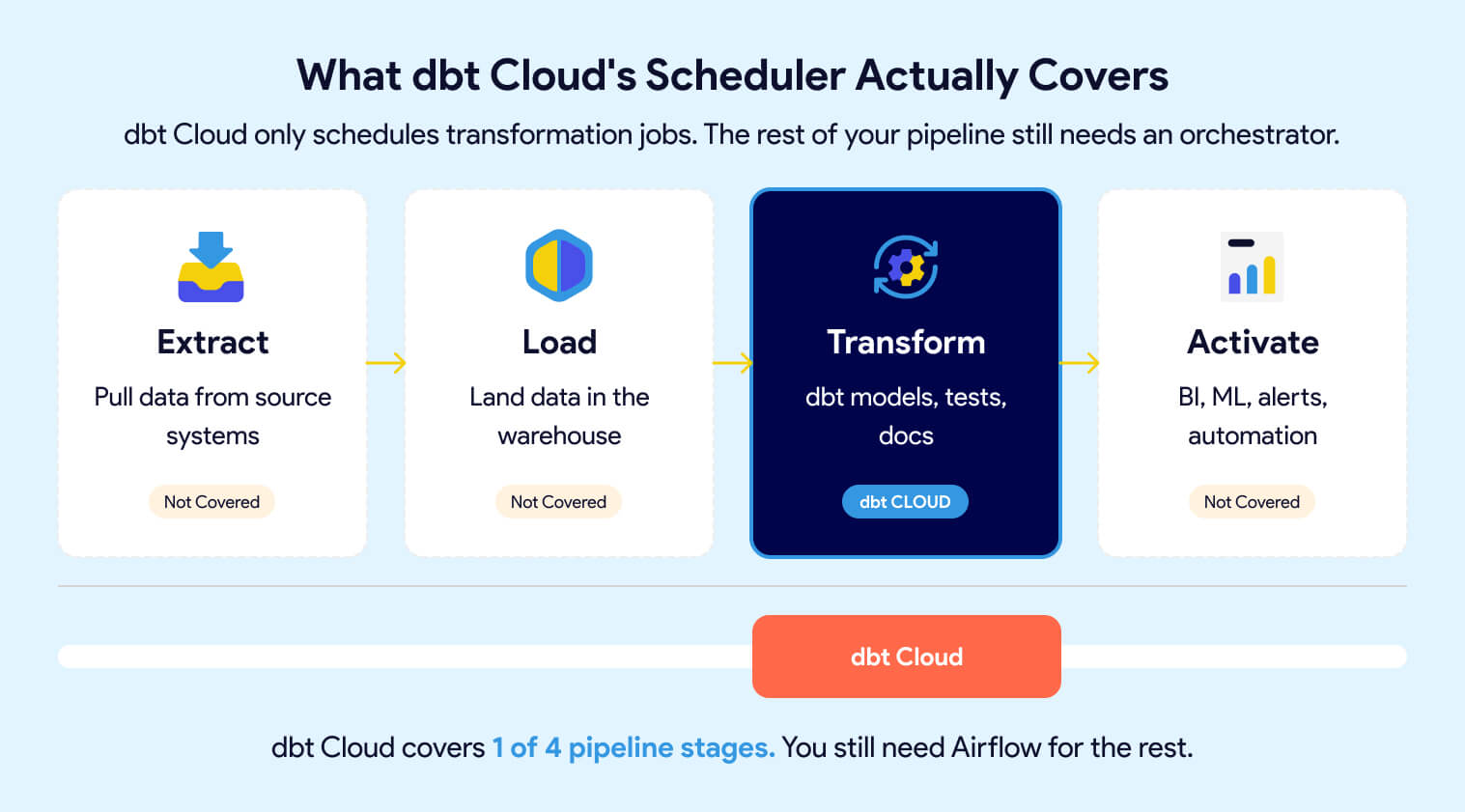
For small teams with a simple pipeline (one source, one warehouse, one dashboard), dbt Cloud's scheduler may be enough to start. But as soon as you add sources, downstream consumers, or cross-system dependencies, you'll need Airflow or a platform that includes it.
Managed dbt Core + Managed Airflow: Removing the Infrastructure Burden
The hidden cost of choosing open-source dbt Core and Airflow is the platform you have to build around them. CI/CD pipelines, secrets management, environment provisioning, Git workflows, Kubernetes tuning, Airflow upgrades -- this is real engineering work that pulls your team away from delivering data products.
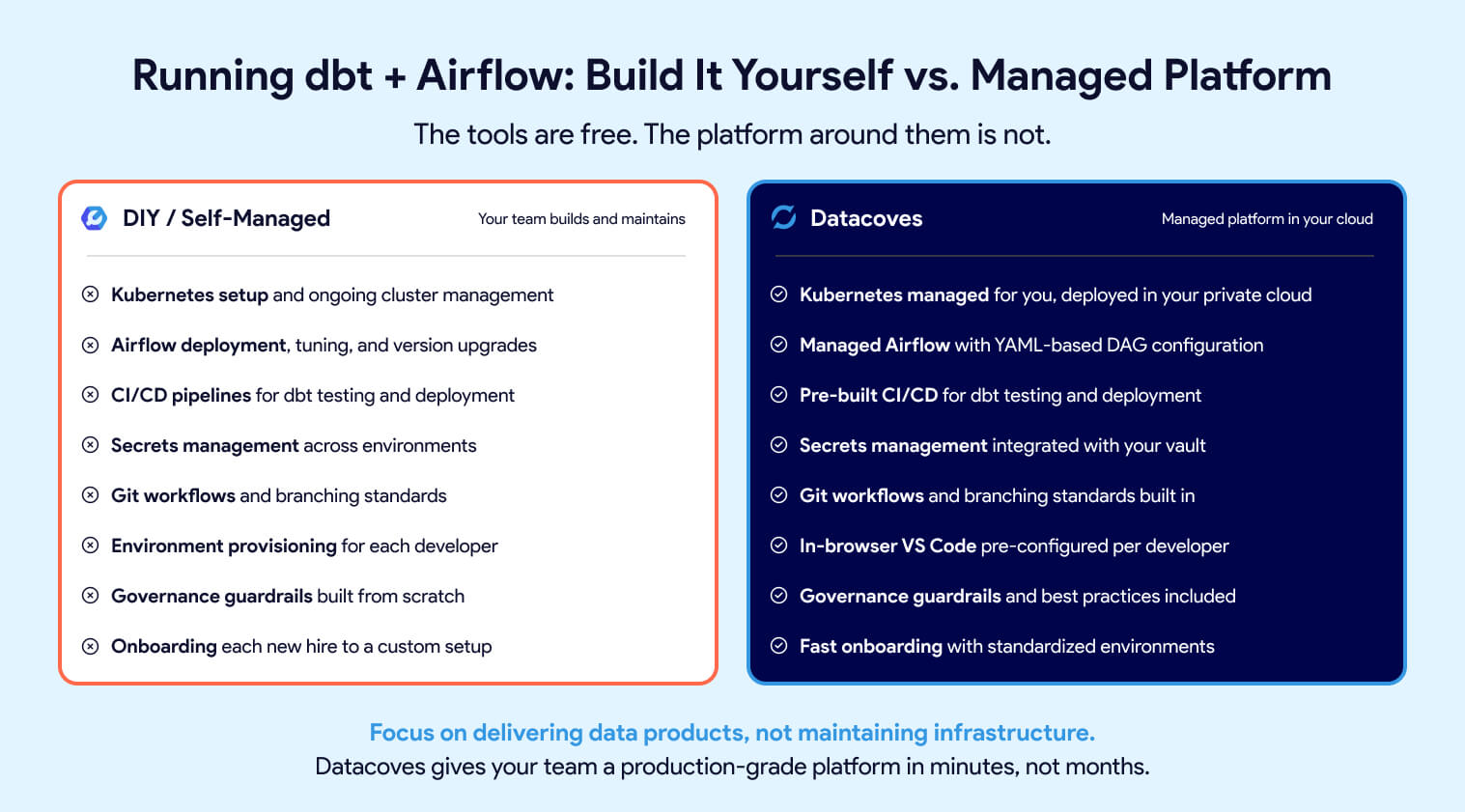
Datacoves eliminates that overhead. It provides managed dbt Core and managed Airflow in a unified environment deployed in your private cloud. Developers get an in-browser VS Code editor with dbt, Python, extensions, and Git pre-configured. Orchestration is handled through Datacoves' managed Airflow, which includes a simplified YAML-based DAG configuration that connects Extract, Load, and Transform steps without writing boilerplate Python.
Best practices, governance guardrails, and accelerators are built in, so teams get a production-grade data platform in minutes instead of months. For a deeper look at the tradeoffs, see our guide on building vs. buying your analytics platform.
To learn more about Datacoves, check out our product page.

dbt vs Airflow: Which One Should You Choose?
This is not an either-or decision. dbt and Airflow solve different problems, and trying to force one tool to do the other's job creates fragile, hard-to-maintain pipelines.
Use dbt for transformation, testing, documentation, and lineage. Use Airflow for scheduling, dependency management, retries, and end-to-end pipeline coordination. The comparison table below shows where each tool fits.
Which Tool Should You Adopt First?
If you need to pick one tool to start with, here's the decision framework:
Start with dbt if your immediate priority is transforming raw data into reliable, tested models in the warehouse. dbt gives you version control, testing, documentation, and lineage from day one. For small teams with simple pipelines, a cron job or dbt Cloud's scheduler can handle automation in the short term.
Start with Airflow if you already have multiple systems that need coordination; extraction from SaaS sources, loading into the warehouse, transformation, and downstream activation. Airflow gives you end-to-end visibility and control across the full pipeline.
The reality: most teams outgrow a single-tool approach quickly. Once your pipeline spans more than one step, you need both. The question isn't which tool to pick, it's how soon you'll need the other one. If you're still evaluating transformation tools, check out our dbt alternatives comparison.
How dbt and Airflow Work Together
In a production pipeline, the tools fit together like this:
- Airflow triggers extraction and loading, kicking off tools like dlt, Airbyte, Fivetran, or Azure Data Factory to pull data from source systems into the warehouse.
- Airflow triggers dbt. Once data lands in the warehouse, Airflow calls dbt to run transformations and tests in the correct sequence.
- Airflow handles downstream activation. After transformation, Airflow pushes data to BI platforms, refreshes ML models, triggers marketing automation, or sends alerts.
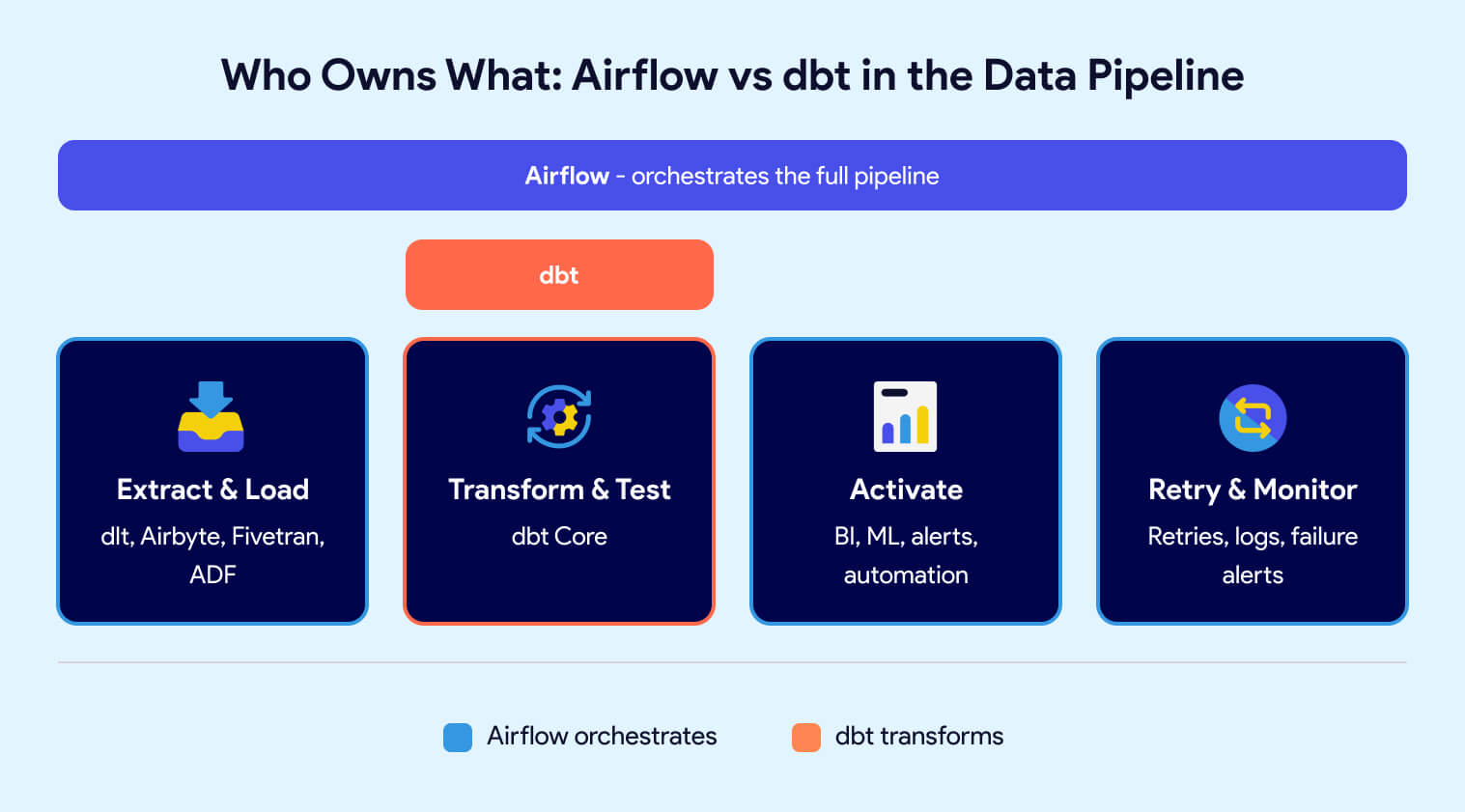
Airflow owns the "when" and "what order." dbt owns the "how" for transformation. Neither tool steps on the other's responsibilities.
The challenge is running them together. Deploying Airflow and dbt Core in a shared, production-grade environment requires Kubernetes, CI/CD, secrets management, environment provisioning, and ongoing maintenance. For teams that don't want to build and maintain that platform layer themselves, a managed solution like Datacoves provides both tools pre-integrated in your private cloud -- so your team focuses on data, not infrastructure.
Conclusion: dbt and Airflow Are Better Together
dbt and Airflow are not competing tools. dbt transforms your data. Airflow orchestrates your pipeline. Trying to use one without the other leaves gaps that show up as fragile pipelines, manual workarounds, and constant firefighting. The teams that struggle most are the ones who pick the right tools but never invest in the platform layer that makes them work together.
The real question is not "dbt vs Airflow," it's how you run them together without building and maintaining a platform from scratch. That infrastructure layer (Kubernetes, CI/CD, secrets, environments, Git workflows, upgrades) is where most teams burn time and budget.
Datacoves gives you managed dbt Core and managed Airflow in a unified environment, deployed in your private cloud, with best practices and governance built in. Your team focuses on delivering data products, not maintaining the platform underneath them.
FAQ
Can you use Airflow without dbt?
Yes. Airflow orchestrates any workflow: Python scripts, external APIs, data ingestion tools, ML pipelines. But for in-warehouse transformation with built-in testing, documentation, and lineage, dbt is the right complement. Running raw SQL inside Airflow tasks is possible but hard to maintain, test, and document at scale.
Can you use dbt without Airflow?
Yes, for simple pipelines. dbt Core has no built-in scheduler, so you need a cron job, dbt Cloud's scheduler, or a similar option to automate runs. Once your pipeline spans more than just transformation (extraction, loading, downstream activation) you need an orchestrator like Airflow to manage the full workflow.
Does dbt Cloud replace Airflow?
No. dbt Cloud's scheduler automates dbt transformation jobs, but it does not orchestrate extraction, loading, downstream activation, or cross-system dependencies. If your pipeline is Extract, Load, Transform, Activate, dbt Cloud only covers the Transform step. You still need Airflow for end-to-end pipeline coordination.
How do dbt and Airflow work together?
In a production pipeline: Airflow triggers extraction and loading (via dlt, Airbyte, Fivetran, or ADF), then triggers dbt to run transformations and tests in sequence. After transformation, Airflow handles downstream steps like BI refreshes, ML retraining, and alerting. Airflow owns the "when and in what order." dbt owns the "how" for transformation.
Is Airflow harder to use than dbt?
Airflow has a steeper learning curve. It requires Python proficiency, familiarity with DAGs and operators, and knowledge of deployment on Kubernetes for production setups. dbt is SQL-based with a lower barrier to entry for analysts and engineers who already know SQL. Infrastructure management for dbt grows harder at scale, but the initial ramp is faster.
Is Airflow still worth it in 2026, or should I switch to a modern orchestrator?
Airflow is still the dominant orchestration standard. Dagster and Prefect are growing, but they serve different use cases. Airflow is the right choice for teams that need broad enterprise support, schedule-driven pipelines, and a large talent pool. The strongest argument for Airflow is that it is the most universal one. Airflow 3 has also closed the gap with other orchestrators.
Should I use Airflow or Dagster with dbt?
Airflow is the safer default. It has 10x the download volume of Dagster, a massive community, and broad enterprise adoption. If you have existing Airflow DAGs, a large team, or need broad hiring support, Airflow is the more pragmatic choice.
What are the biggest challenges of running dbt and Airflow together?
The platform layer. Deploying dbt Core and Airflow in production requires Kubernetes, CI/CD pipelines, secrets management, Git workflows, and ongoing maintenance. Each tool works well independently, but connecting them reliably in a production environment is real infrastructure work that pulls teams away from delivering data.
What is Cosmos and should I use it with dbt and Airflow?
Cosmos is an open-source library from Astronomer that auto-generates Airflow DAGs from dbt projects. It maps dbt models to individual Airflow tasks, giving you per-model visibility and retry control inside Airflow. It is a option if you are already on Airflow and want tighter dbt integration without switching orchestrators, but there are downsides such as the additional warm up time for dbt which includes parsing and compiling. For larger projects this time can exceed the actual transformation time. Platforms like Datacoves offer approaches that simplify dbt retry without the overhead of creating many airflow tasks.
What is the best way to run dbt and Airflow together in production?
The best approach is a unified environment where both tools are pre-configured, connected, and maintained. This includes managed dbt Core with CI/CD, a managed Airflow instance with separate dev and production environments, Git-driven workflows, and secrets management, all running in your private cloud. Building this yourself is possible but expensive. Managed platforms like Datacoves deliver this out of the box so your team focuses on data products, not platform maintenance.
What is the difference between dbt and Airflow?
dbt transforms data inside your warehouse using SQL. It handles modeling, testing, documentation, and lineage. Airflow orchestrates workflows across your entire data pipeline. It handles scheduling, dependencies, retries, and coordination between tools. They solve different problems and work best together.
What is the total cost of running dbt Core and Airflow?
Both tools are open-source and free to use. The real cost is the platform around them: CI/CD setup, environment provisioning, secrets management, Kubernetes tuning, upgrades, and ongoing maintenance. Teams often underestimate this overhead. Managed platforms like Datacoves eliminate most of it by delivering both tools pre-integrated in your private cloud.
Which tool should you start with, dbt or Airflow?
Start with dbt if your immediate priority is transforming and testing data in the warehouse. Start with Airflow if you already need to coordinate multiple systems: ingestion, transformation, and activation. Most teams need both once the pipeline spans more than one step.

-Photoroom.jpg)


.png)